Everything posted by AndrewG
-
Just an FYI for you: http://specialtyz.com/blog/?page_id=178
-
In the first instance check the plug contacts/resistor tails for corrosion. It is also possible the IMΩ resistor has failed (in the heat).
-
That can depend on the carrier used. From past experience some will hold the goods in the UK and send you an invoice letter, whilst others send the invoice letter independently of delivering the goods. What paper work came with the goods?
-
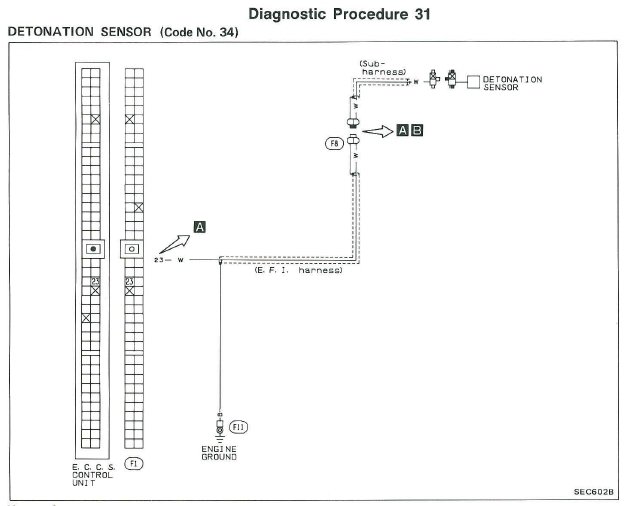
What makes you think that on your car the Detonation sensor signal wire is Brown? The factory wiring diagrams show White (pin 23 ECCS connector) This is a coloured ECCS diagram to help you. ECCS_colored_m.pdf
-
These are the Bose and non-Bose wiring diagrams. You can tell which your car has by lifting off one of the rear speaker covers. If you see a black plastic speaker enclosure then you have a Bose system. If you see a speaker mounted on a metal bracket then you have a non-Bose system. EL90-91.pdf
-
For reference the part numbers for the 99 spec lights are: 26555-VP125 L/H Tail light Assembly 26550-VP125 R/H Tail light Assembly 26540-VP100 Centre Tail light Assembly
-
For car parts you will be charged duty (4.5%) on the declared value of the goods and then VAT (20%) on the goods, the shipping and duty combined. Plus a courier handing admin fee for customs clearance (usually £12 to £20 depending on the courier).
-
For example: https://conceptzperformance.com/nismo-nissan-jdm-taillights-complete-3pc-kit-nissan-300zx-z32-26550-vp125-kt_p_131.php
-
VJ, just to be clear. How are you reading the code 34? How are you clearing the code 34?
-
For the 1MΩ resistor workaround to work the F8 plug - ECU side (see above) needs the ground to be present.
-
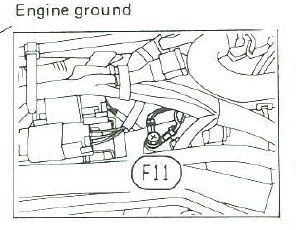
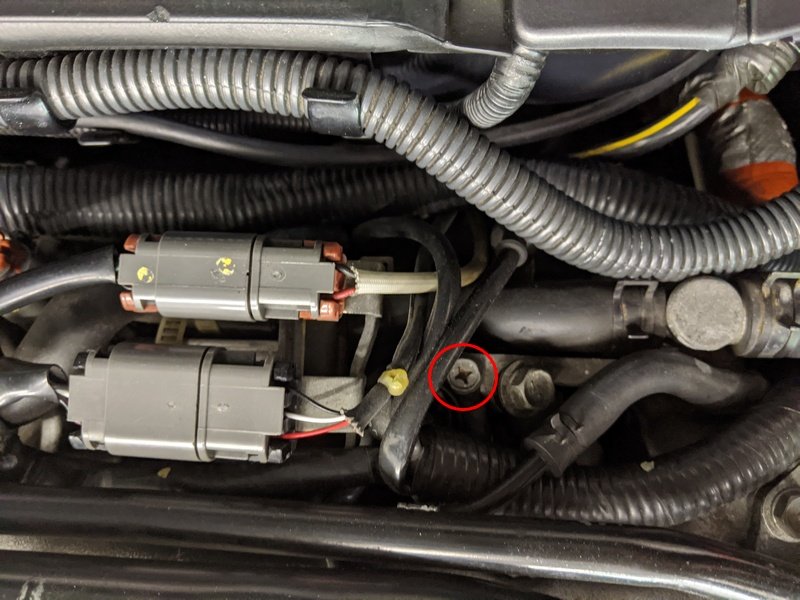
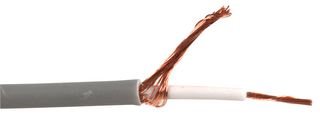
Just checked for you, the factory earth point for the detonation shield is (F11) shown above as "Engine Ground". Just earth one end of coax wire. Circled below.
-
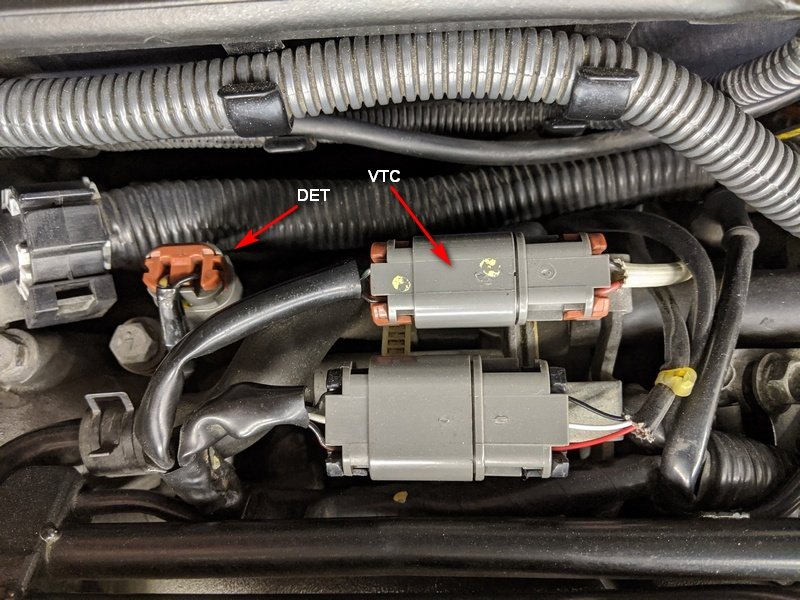
The detonation sensor circuit is the left hand plug in the picture below (white and black wires main harness side). The left bank VTC plug (yellow dots on plug with green/black and black/red wires main harness side). The main harness plugs are interchangeable and is it not unknown for them to be incorrectly swapped over, this will give a code 34.
-
Using shielded wire like this: The ground can be anywhere near the ECU as below: How are you dealing with the sub-harness? It is under the lower plenum and almost impossible to reach with the engine and gearbox in situ. Have you relocated the detonation sensor?
-
Is your car a UK spec or JDM?
-
-
Just so we are working of the same page. These are the FSM diagnostics for the Knock sensor. Can you confirm that you have gone through them? EF-EC 132.pdf EF-EC 179.pdf The knock sensor also has a sub harness. Only one signal wire is connected to the sensor (see EF-EC 132) , the second wire is for the earth shield. It is very important that the earth shield is intact as it goes from the sub harness plug up to the sensor (penultimate paragraph): http://twinturbo.net/nissan/300zx/forums/technical/view/1146799/The-important-truth-about-your-knock-sensor.html
-
You might want to include this kit with your order (if you haven't): https://conceptzperformance.com/czp-upgraded-heavy-duty-clutch-fork-kit-nissan-300zx-z32-30531-cd000-fk-z32_p_9315.php
-
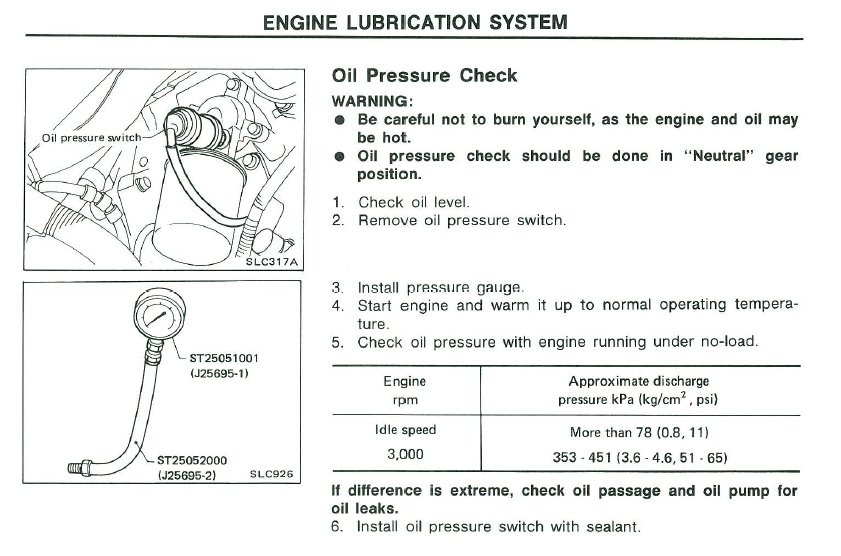
These are the figures from the FSM. Low oil pressure reading (on the dash gauge) when mid rpm is typically the oil pressure sensor/switch failing (assuming the oil level on the dipstick is correct).
-
Now, if they only came in Blue...
-
My apologies, I do have the Installation guide for the Nissan remote door locking system kit (H0560-40P00) specific for the Z32. It is in Japanese though. This is the parts link for the Z32 version (better than the one I posted above). http://jp-carparts.com/nissan/partlist.php?maker=nissan&type=132&cartype=1&fig=H05&page=2 and this is the Installation quide: H0560-40P00 Installation quide.pdf
-
Thanks for the info. I have ConZult happily running on a Win7 Professional 64bit laptop. I was contemplating upgrading to Win10 64bit at some point, but will leave things as they are.
-
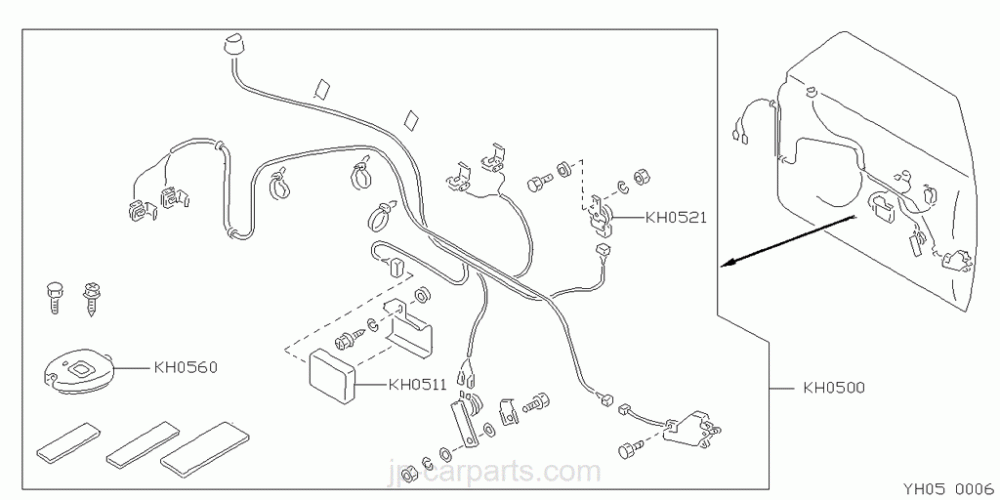
H0561-35F00 (KH0511 in diagram below) is part of the Nissan remote door locking system kit (H0560-64J27) offered in the JDM market an option. http://jp-carparts.com/nissan/partlist.php?maker=nissan&type=69&cartype=6&fig=H05 I don't have the Japanese circuit diagram, but the parts diagram shows the key parts and wiring. And yes, scotchloks were supplied in the kit!
-
ClassicLine Insurance (www.classiclineinsurance.co.uk) for the last two years. Agreed value and no problem with extensive list of modifications. Howard (BigH) used them and recommended them to me.
-
Did ConZult still fail to run on Windows 10 (64 bit) with set “Enable 32 bit applications“ to "True"?
-
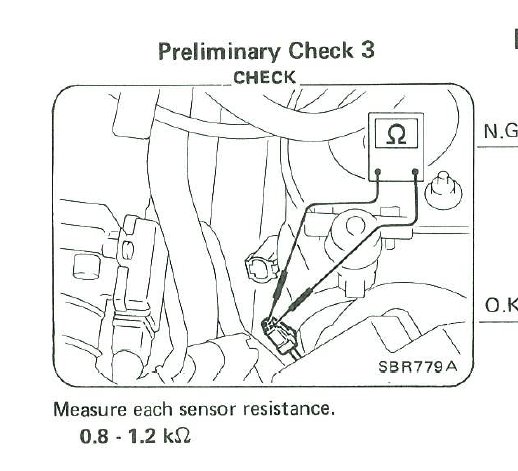
Looking for the plug (of the type in the picture above) measure the resistance as below: