





Everything posted by AndrewG
-
Is there a maker's mark on them (usually found on the base)? I too have a box full of Nismo F&R bushes waiting to go on.
-
Which make/supplier of aftermarket lower ball joints have you gone for?
-
Nissan FAST shows my UK spec TT to be using either 40210-33P07 (NTN) or 40210-33P02 (NSK).
-
For part# 40210-33P07 https://conceptzperformance.com/nissan-infiniti-nissan-oem-front-wheel-axle-bearing-nissan-300zx-z32-40210-33p07_p_1887.php The dimensions are: https://size.name/en/products/fc35247
-
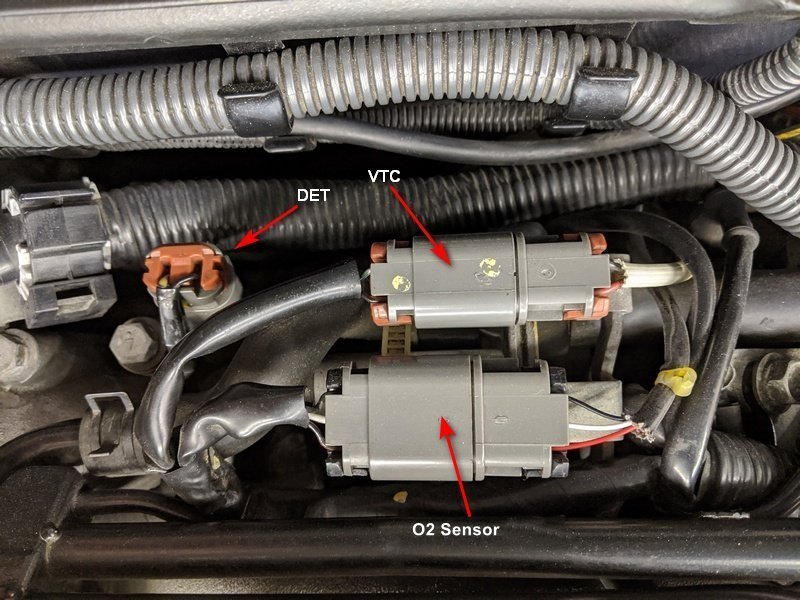
The detonation sensor circuit is the left hand connector in the picture below (white and black wires main harness side). The VTC connector (yellow dots on plug with green/black and black/red wires main harness side). The O2 Sensor connector is at the bottom (Black, White and Black/Red wires main harness side).
-
Easier to see without the T-Tops in situ:

-
As Stephen says check the PTU connections for corrosion damage (usually a green film on them). Also consider early PTU symptoms and failure:
-
Welcome to the Club Eric. Production date was February 1990: https://nissan-europe.epc-data.com/300zx/z32/2953-vg30dtt/?frame_no=JN10RGZ32U0000316&ref=
-
Welcome to the Club Nicolas! When you have a moment please post up some pictures of your Zed.
-
Welcome to the Club Matt. I wondered what had happened to Anthony's (winnoze) car. Nice to see it has found a new home.
-
Welcome to this side of the pond Jeremy! Look forward to seeing more photos from your Z32 journey.
-
Do the main beams come on with the stalk (and in the flash position)?
-
Just to add to Stephen's reply above. Assuming you haven't already removed the plenum, this guide will give you info on the procedure: http://www.twinturbo.net/nissan/300zx/tech/plenum/plenum.aspx
-
Welcome to the Club Ayrton and best wishes on turning your obsession into ownership!
-
Nice looking collection of cars - thanks for taking the time to put them up Richard.
-
Nissan documentation below. Fresh DEXRON is red in colour. TT.net information on Power steering problems and solutions: http://www.twinturbo.net/nissan/300zx/forums/main/view/1109051/Power-steering-problems-and-solutions.html


-
Still have the ones we wore to the NEC.

-
If you have got power (mains) where you store the car, get yourself a battery conditioner/charger. Something like a CTEK which can be left connected for long periods.
-
There was a thread a while back taking that approach (scroll down): https://www.300zx-owners.club/forums/topic/70784-engine-block-coolant-drain-bolt/ I've not done that so can't comment on how well it works.
-
Don't forget that the thermostat will be closed impeding the flow.
-
The first run was done many years ago which I bought from. There was a second RobZ run planned which Aff68 on here was involved in but I don't know what became of that. Polar engineering in the US are/were also making their version: https://www.polarengineering.co/product-page/nissan-z32-300zx-billet-throttle-bodies-62mm
-
Here are the pages from a copy of the owners manual covering coolant change: 7-4-6 1991 OM Nissan 300ZX.pdf The drain on the engine block can be awkward to get to and open. A full drain refill will need 10 litres of new anti-freeze/coolant. You want to be using "Traditional" Inorganic Additive Technology (IAT) Ethylene Glycol base. In this country (winter) 50/50 mix with distilled water is satisfactory. I change mine every two years and get it premixed from Nissan - L248 Premix Engine Coolant/Antifreeze KE902-99945.
-
Sure: https://conceptzperformance.com/garrett-chra-center-housing-rotating-assembly-gt2554r-replacement-for-jwt-530bb-czp-vanilla-zero-g5-835995-5001s_p_10912.php The machined billet compressors really are a work of art.

-
Welcome to the Club Liam and the start of your Z32 adventure!
-
They are JWT 530BB's. They will be fitted with new CHRA's from Turbos Direct. Basically this kit: https://conceptzperformance.com/czp-zero-g5-garrett-billet-ball-bearing-twin-turbo-kit-550hp-nissan-300zx-z32-00-14411-g5-kt_p_37568.php


