Everything posted by JaiKai
-
Lots of changes to the club over the last month or so with the upgrade and move away from vBulletin. The next thing inline to get an overhaul is the Classifieds; the new system is a purpose built ecommerce system rather than just a sub forum with tags in the title of each post we create. That being said the new system has lots of new features that allows as to shake things up a bit. First thing we have done is reduce the categories down to four split between 'Car For 'Sale' and 'Parts For Sale' and the wanted variants. You can now post an offer officially for items so there is no first dibs. Next thing and likely the biggest thing we have done is open up the classified system so that 'Standard Members' can sell too. So all that's needed to sell is to be apart of the 'Standard Members' group and that's where a few other things are changing. The user member base has been split up into 3 groups as follows : Registered As you register for the club you are placed in this group and if and when you create 30 posts and have been a member for 30 days then you are promoted to a Standard User Registered members can reply to Standard and Premium selling posts but cannot post to sell. Standard Member This group is allowed to use the Classified System but there selling posts are less prominent than Premium Members Also the selling time is default to 7 days before the post expires. Members in this group will stay as a Standard member as long as your activity doesn't fall below 30 days of inactivity. Premium Member (paid) This group has full selling rights and is allowed to create their own selling area. Any selling will be shown evenly with other Premium Content and will be shown ahead of Standard members. Selling has no time limit for Premium Members and the items being sold will auto renew. So this means you have to at least contribute towards posting on the club and be an active user for 30 days to sell. All Premium Member Adverts are featured content; and are displayed in various locations on the site and in front of Standard Members so that as a Paid member you still have a greater benefit over normal users. Rules are also in place to Promote and Demote Registered and Standard Members based on there activity and posts towards the community. This new system is active; however we will change it if necessary if we feel its not working properly. Any issues please let me know.
-
Hi all, I'm looking to change the way the classified system works and start to allow the 'Standard Member' group to be able to sell. This is going against the way it has always been for the club but hear me out on the following - The user member base has been split up into 3 groups as follows : Registered As you register on the site you are placed in this group and if when you create 30 posts and been a member for 30 days then you are promoted to a Standard User Registered members can reply to Standard and Premium selling posts but cannot post to sell. Standard Member This group is allowed to use the Classified System but there selling posts are less prominent than Premium Members Also the selling time is default to 7 days before the post expires. Premium Member (paid) This group has full selling rights and is allowed to create their own selling area. Any selling will be shown evenly with other Premium Content and will be shown ahead of Standard members. Selling has no time limit for Premium Members. So this means you have to at least contribute towards posting on the club and be an active user for 30 days to sell. All Premium Member Adverts are featured content and are displayed in various locations on the site and in front of Standard Members so that as a Paid member you still have a greater benefit over normal users. Rules are also in place to Promote and Demote Registered and Standard Members based on there activity and posts towards the community. Hopefully when activated this new system will encourage more interaction and invite people from the social media areas.
-
Done a bit of reorganisation on the classifieds in that i have generalised the catagories to make it easier. Also any registered user can post a wanted advert now. More updates to follow..
-
The selling system isnt part of the forum and works like a proper ecommerce system now. So you cant bump the selling post as such, but there is various adverts proped about the site that show random adverts now. I will add some more to make it more abvious for people. All in, i think the new system is better as you can see what people are selling from the main page now as an image.
-
Not sure, The new Classified section isn't that much different. In terms of the sections i kept that identical and the items posted dont expire either so they should stay active until the member removes it.
-
Happy Birthday Jeff. P.S is this section in premium members ?, wasn't sure if jeff would see it or not. Only kidding, lol
-
Happy Birthday Gary
-
Now that we all can reply, Happy Birthday?I noticed that too, Seems after the first time you read it it defaults back to the first page post rather than last. This might be a bug in the software.Hi Ian, Good to have you back online. Lots of changes lately all for the better so I hope you stick around. Leeok, I've made some changes and i think it works alot better : At the top right side we have Latest Content; This will show everything in the system from the last 4 weeks, unread content is in bold. The top Activity menu has similar preset streams like : Latest, Unread, Started & Replied Also added the custom Streams menu at the bottom which show everything you decide to save as custom. The default is 'Latest Content', but you can overide that by selecting your own stream.I can understand what your trying to do but cant get it to work that way either. What we want is to get it to display the last unread comment for each particular thread rather than them all.And now fixed. Everyone should be able to see the new link to the left bar.Seems we have a bug in the system, as only the committee can see the link in the profile. mmm.The Profile / Gallery section is locked out so that only Premium members can create in those sections, But anyone can view it.It looks more glossy in this picture but it is painted in satin.
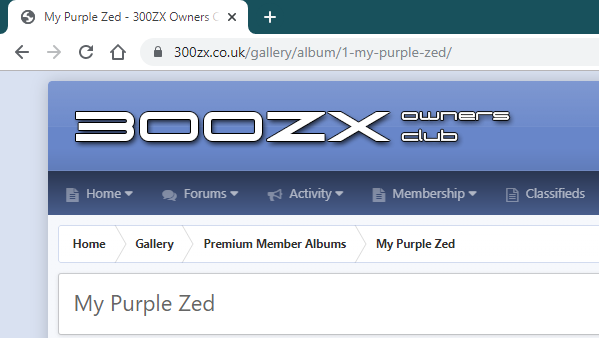
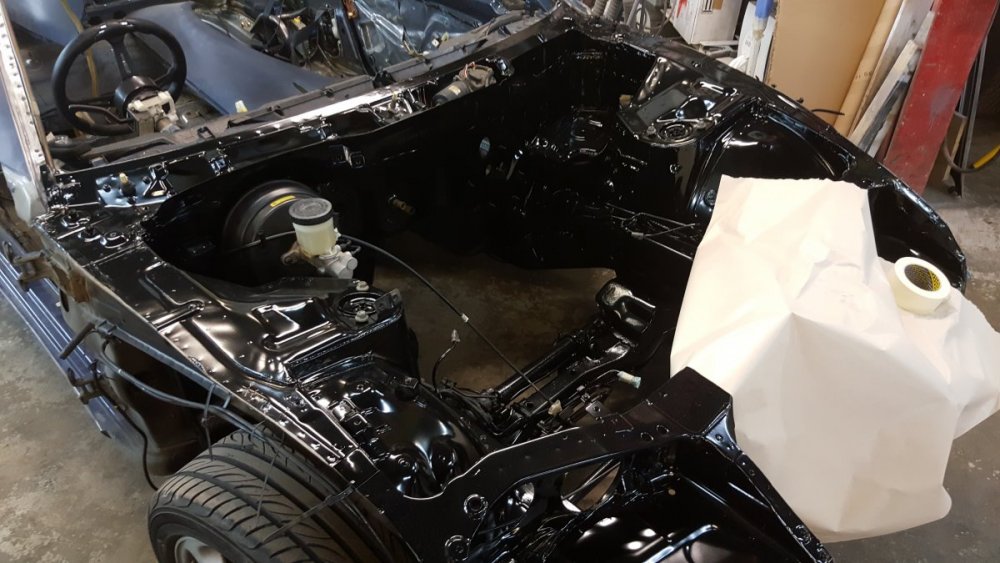 i done my full engine bay in Satin Black. looks great in contrast with the shiny stuff i have.Who else sung that to themselves when reading it?No, as it wasn't left on for too long. Not that i bothered at the time as i was getting a respray.When I resprayed my zed I used nail polish remover to get all the gunk off.Your gallery name can be found on the top URL bar of your gallery as follows. If you copy just the end part with no trailing slashes (/) that should activate the feature.
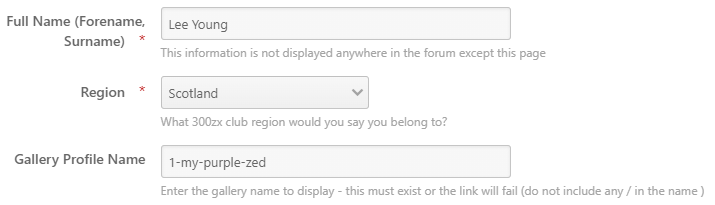
 Slight update on this feature. You now only need to add the gallery name rather than the full URL as follows :
 Just starting to update my own Gallery profile too. And i think you can link previously uploaded pictures used in posts so you dont have to upload them twice.Yeh, as the whole side panel reduces in size and the stats panel gets hidden.