

Everything posted by JaiKai
-
-
Congratulations Andrew, well deserved.
-
All posts and threads will be preserved for the lifetime of this club. However threads and members comments need to be kept in the private sections where originally posted.
-
I understand what you are saying but its not that easy as the full section is locked to the Premium Membership. Moving all the content out to be available to non - premium members would defeat the purpose of it in the first place. I can only suggest that you take note of any content you wish to keep or pass on to others.
-
I'd just like to give a warm welcome back to all the members who have decided to give our Club a visit again. For whatever reason you previously left us; please don't be a stranger and ensure you post a wee hello to say you are here and what you have been upto..
-
Nothing much for me last year. Felt like a great buildup then a kick in the bollocks at the end. Hopefully i get everything sorted for this year.
-
I've manually fixed them all. Not sure why they are not automatically renewing as checked the settings and everything looks good to renew.
-
There's a lot of great looking zeds not in the list but unfortunately the owners never listed them. ?
-
I've already set the section to guest so it shows for everyone. We shouldn't see this issue again unless you share a premium section thread.
-
What was happening was facebook visits our club and generates a small image of what the page looks like. But the page cant be accessed without having a valid account and logging into the site which facebook cant do. So it sees an error message instead warning us to login to the website to view the page.
-
You only have one thing for it then! Move away from London, as a new house will likely be cheaper than the upkeep of a zed these days. ?
-
Hi Chris, The website is generating the error but it's indirectly caused by Facebook. When using the Facebook app on any device the app uses its own builtin Web browsers. And when the links are loaded they are in a section of the website that doesn't show without you being logged in. I've recently changed the standard sections so that guests can now see them so hopefully we won't see as many issues.
-
Time to start building a new garage profile then link it to your main profile so everyone can see it. The new system is much easier to upload pictures on.
-
Looks great. Wish i could get mine going again, too many issues with the engine again.
-
Vote for none of the above as i'm not actually in this poll !? Serious respect to all in this poll and good luck to you all.

-
Welcome to the 300ZX Owners Club Car of the Year Voting. The six entries for this year are as follows : AndrewG Chris300 Gaz300 bigh Joely P Oakview Details on each car and display pictures can be found on the entry thread [ here ] This voting thread will be closed automatically on the 4th of January 2020
-
Merry christmas everyone.

-
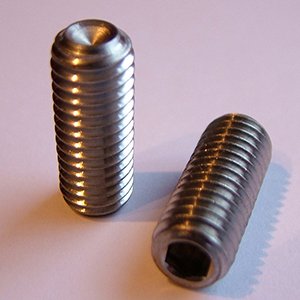
As an example i believe it's these you are looking for :
-
I understand now. They are called 'Cup Grub Screws'
-
Are you saying that the new BMC center hole that needs plugged doesn't have an inner thread ?
-
They are just grub screws; however not sure of the thread type.
-
Ours is a bit feeble compared to that mate.
-
Its likely weeping as its not getting used enough.
-
Should be fixed now
-
Its a percentage of the declared value that Z1 has put on the parcel plus various courier fees.