Everything posted by AndrewG
-
That's where the handy "View my Z Profile" comes in!
-
Satin Black.
-
It wasn't that long ago that a Z32 would be condemned for that amount of corrosion. Lovely to see it being restored!
-
Did that not remove the paint as well?
-
Just set up my 'View my Z Profile' link. If you click on mine (look for any post I've made) you can see how I've used the Album description to fill out the details of my car and the modifications I've made. The facility makes it easy for readers to quickly see the full details of a member's car when reading one of their posts and responding.
-
That's great news! I don't think your car is in my UK specs database. If you PM the VIN I will add it.
-

From the album: Project 1547 - Out of the Blue
JL Audio Subwoofer in custom low profile enclosure More details here -
OK, that's where I first noticed the phenomenon. I posted a reply last thing yesterday to a sub question and came back on to find it had disappeared, only for it to have moved because of the "sort by votes". As these threads are usually built up of conversational responses I think it would be preferable to retain their cronological order by default. You can see the effect in this thread by toggling between the two ordering rules:
-
I know that, but how do I set it so that ALL the threads I view automatically display in cronological order?
-
How do I set the thread display preference from Sort by Votes to Sort by Date for ALL the threads I view?
-
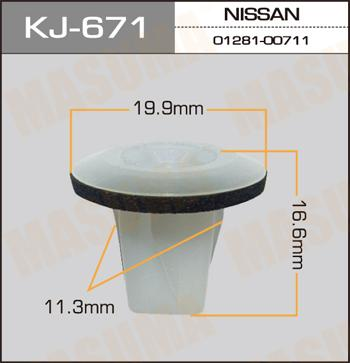
Something like this would likely do the job: https://www.ebay.co.uk/itm/For-Toyota-10-plastic-nylon-screw-grommet-M5-fitting-fastener-bumper-fender/232001426165Can you measure the square hole it fits?Yes, unless you have the later lower plenum which will match your later fuel rails, go with the early fuel rails and an adapater kit. It will be less work to install.

From the album: Project 1547 - Out of the Blue
Classic Motor Show NEC - November 2019Later style fuel rails require maching to the lower plenum to fit. Sure, my original post has the details (just scroll down a bit):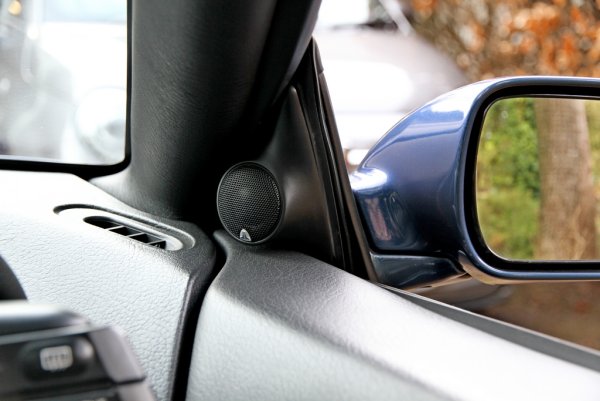
From the album: Project 1547 - Out of the Blue
JL Audio Tweeter in custom mirror sail housing More details hereI see that Z1 have two TT lightweight flywheels - a MK1 and Mk2 version. Which one did you go for?Is the problem here that the ring gear is machined into the flyweel rather than the seperate Nissan ring gear that say RPS use?You will need an adapter kit to mount the later (pintleless) injectors. JWT make the lowest profile C clamps which make it easier to remove/replace injectors once the upper manifold is in place. You can get the kit from US suppliers, eg: https://www.specialtyz.com/300zx/jwt-injector-adapter-kit.html As the 06046 is sold as an OEM replacement clutch which will therefore work with a stock flywheel I can't see why it won't work with an aftermarket TT flywheel (lightweight or otherwise) that is machined to the same dimensional specifications as the stock TT flywheel. Provided both clutch and flywheel have been properly balanced seperately then they should work fine together.Is this the model you bought (06046)? https://shop.exedyusa.com/exedy-oem/exedy-oem-replacement-clutch-kit/06046/i-125789.aspxWhy? what reason was given for needing a complete clutch and flywheel?Irrespective of the colour make sure the container states the antifreeze is Ethylene glycol (and not the Organic Acid Technology - OAT variety). The two types do not mix together and OAT should not be used in older engines which can be damaged by OAT (eg seals and gaskets).