Everything posted by AndrewG
-
 You might want to check your fuel damper: http://www.twinturbo.net/nissan/300zx/forums/general/view/2610744/Here-is-how-it-works.html
 -
Did you smear some light oil on the fresh metal?
-
Still got your carbon canister? Checked fuel tank filler pipe and hoses connecting to fuel tank?
-
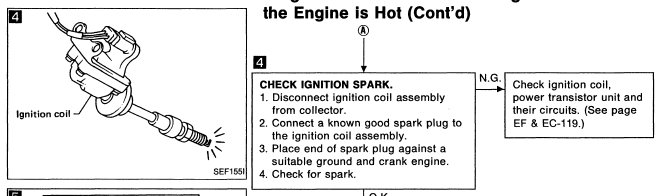
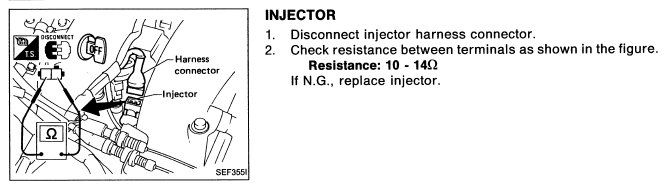
To start these are the things to check from a Power Balance Check (right hand list below): Check the ignition and injector connections for cylinder 4 for corrosion/continuity. Then: and: Check the PTU connectors for corrosion/continuity.

-
Yes.
-
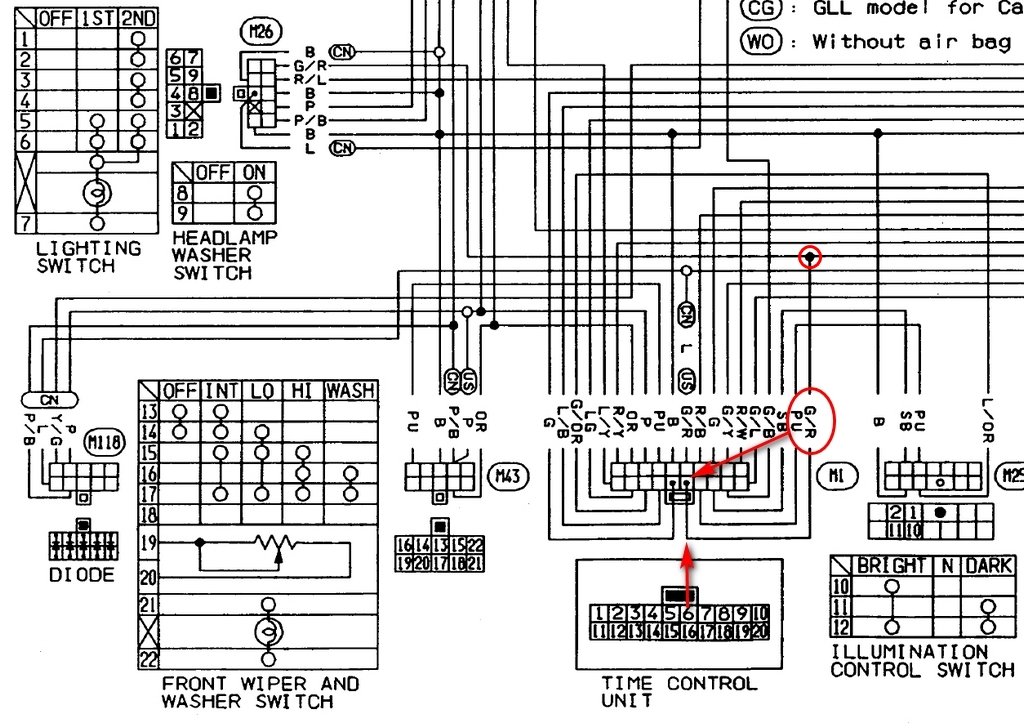
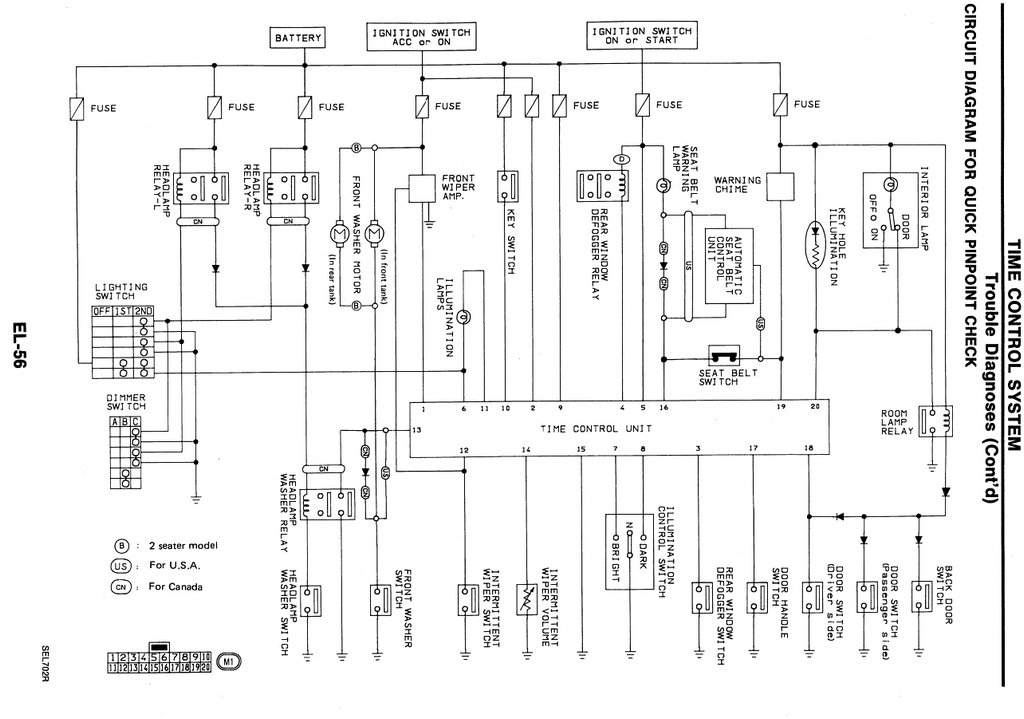
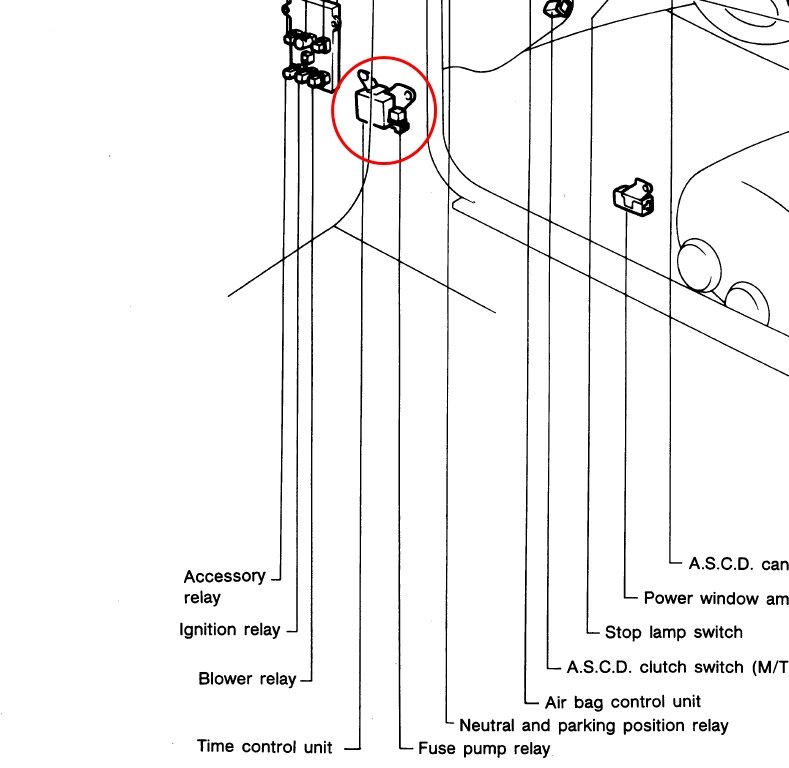
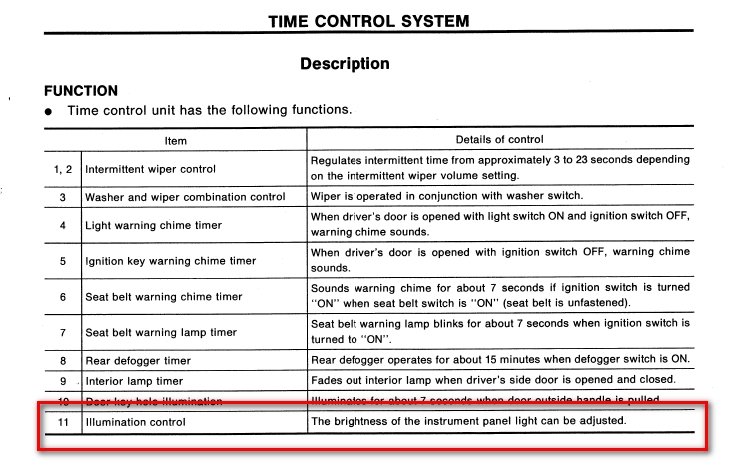
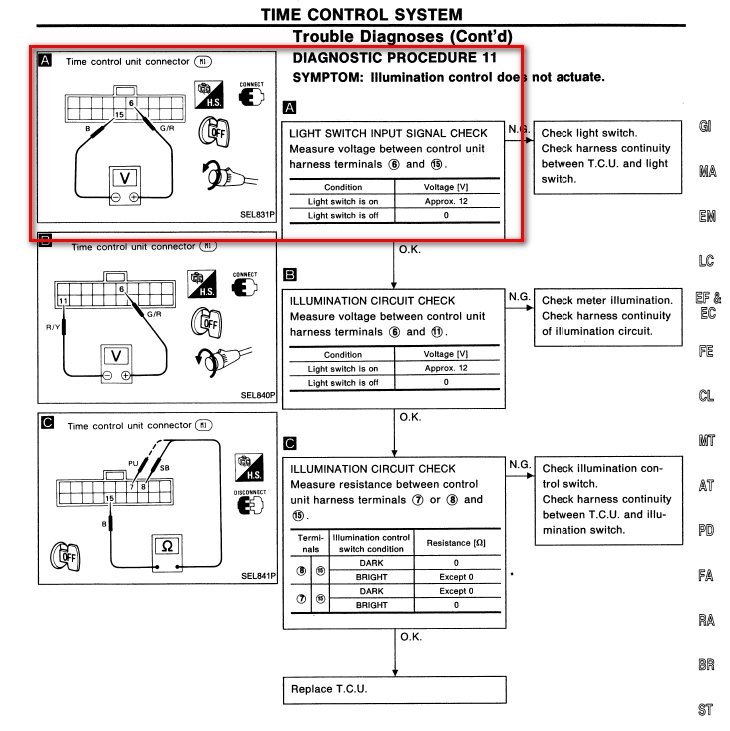
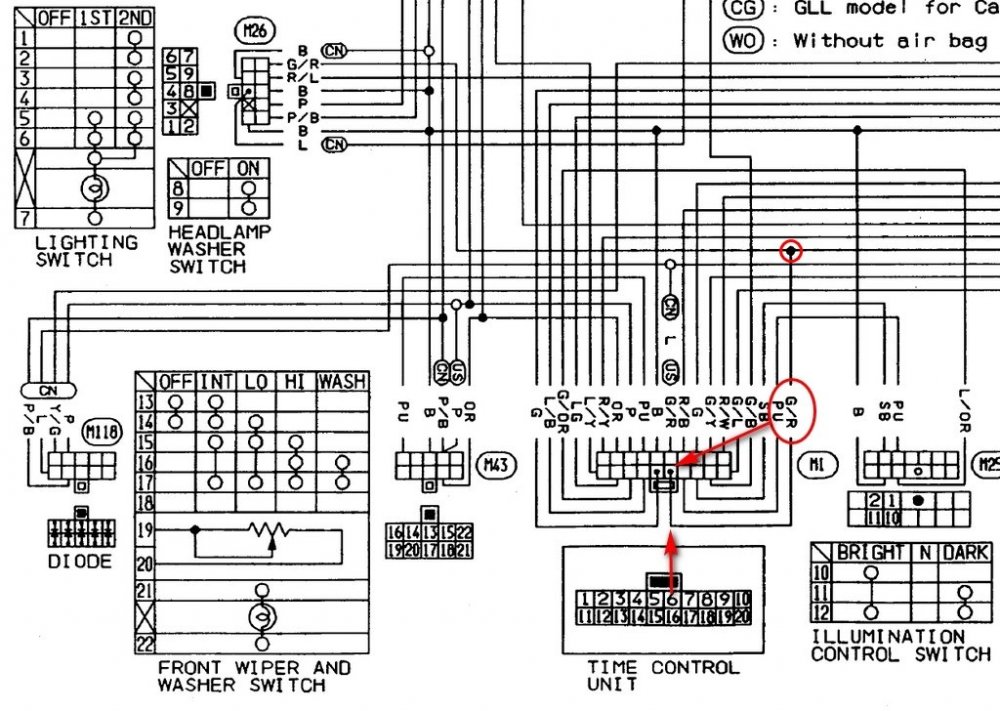
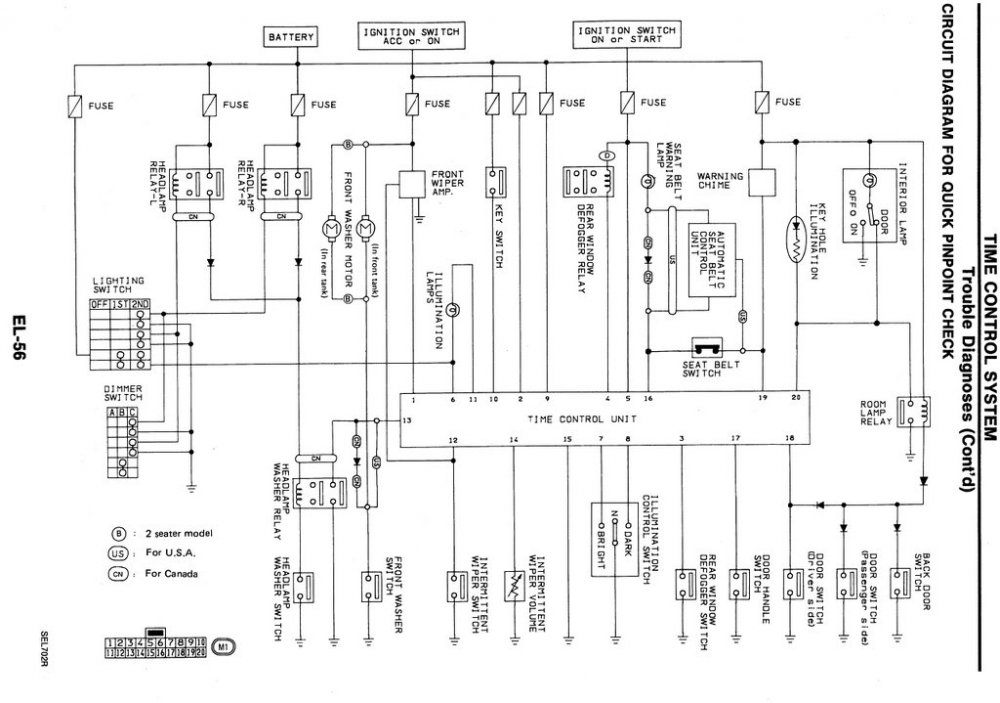
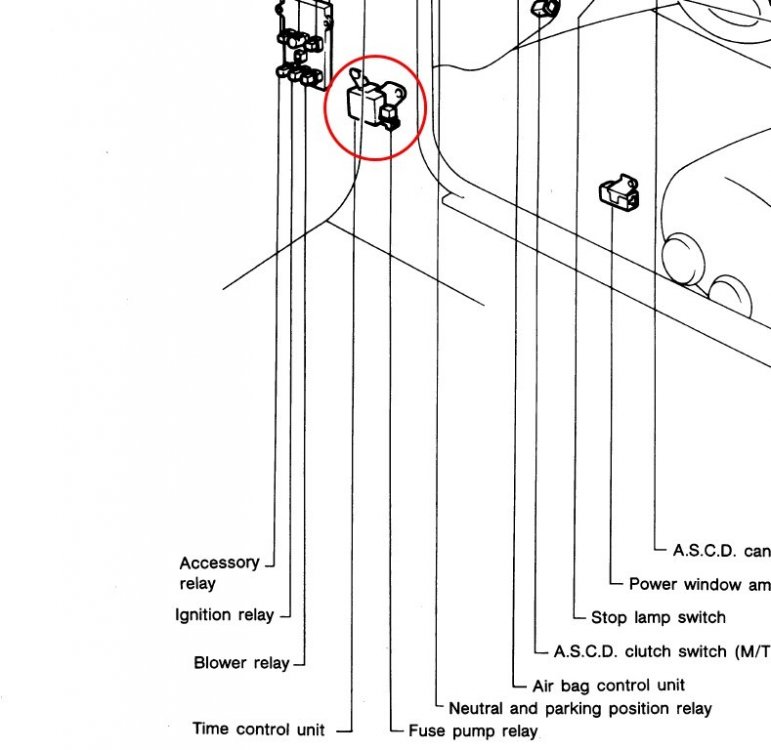
I've had a look into this and there may be a way. Note, I have NOT checked this out on my car and so it is at you own risk to try it out. From the FSM, the Time Control Unit (TCU) controls the ON/OFF and dimming of the illumination lights. See 11 below. The TCU receives its signal for the exterior lights being switched on (both side and mains) on through pin 6 on the TCU. 0v when they are off and +12V when switched on. If that signal is cut, then the TCU won't know when the exterior lights are on and should leave all the instrumention lights on daylight brightness at all times (with the ignition switch on). The wiring harness shows that the TCU pin 6 wire is G/R (green with red strip). The cut needs to be near the TCU as the same signal is used elsewhere in the car. Note - there may be side effects with the TCU's other control functions (see table above) also using this signal. I don't think there are but you will have to see. If the modification doesn't work reconnect the cut wire. The TCU is located behind the drivers kickspace panel (small white plastic box with a green relay on one side).
-
Check with Joely P to see how he got on with his replacement: https://www.300zx.co.uk/forums/topic/148518-an-oem-z32-beyond-expectation/?do=findComment&comment=1725711
-
Alternatively, a dab of blu tack on the end of the screwdriver will hold the screw whilst offering it up.
-
This should help: https://www.tyres-pneus-online.co.uk/tyre-equivalence-advice.html
-
Best wishes in your Birthday Ian!

-
If it helps I can print some templates and send them to you. Regarding the decals for the JDM market just Nissan and Fairlady Z was present on the n/s for both NA's and TT's. Export models had Nissan on the n/s and Twin Turbo on the o/s for TT's.
-
UK specs are missing the 3rd brake light harness as they come from the factory with a dummy light. You will need to run a +12v supply from the rear o/s brake lamp back up to the tailgate hinge through the rubber concertina for the existing wiring harness and down to the 3rd brake light. You can earth the lamp on the rear wiper motor earth.
-
Normally you would replace the 90372-32P00 moulding (item 90332 in diagram below) as it is usually damaged cutting the seal to remove the glass (or is faded anyway). https://jp-carparts.com/nissan/partlist.php?maker=nissan&type=132&fig=900*&part=9037232P00&page=1 The top corner trim clips 90335M and 90336M and the upper trim 90331 (see diagram) can be saved. This is the FSM for the rear glass fixing etc. Make sure they keep (take care of) the two spacers 90714 and 90714A. BF-48.pdf
-
This one? https://www.ebay.co.uk/itm/264660339820?ViewItem=&item=264660339820 I'm pretty sure Andy (phutumsch) had one of these shipped to Jimmer@PowerZed for his car. If so, he should be able to comment on the quality and fitment of the part.
-
Across all markets, the footprint, fixings and connections are the same for TT models 92101-33P00 is the earlier core type, whilst 92101-47P15 is the later more efficient style (see pic below). I'm not sure of UK company that rebuilds them but this one in Japan blogged exactly that. Expensive but it shows that someone is doing it. They are expensive though! http://www.sankyo-rad.com/?p=16939 translated: https://translate.google.com/translate?sl=ja&tl=en&u=http%3A%2F%2Fwww.sankyo-rad.com%2F%3Fp%3D16939

-
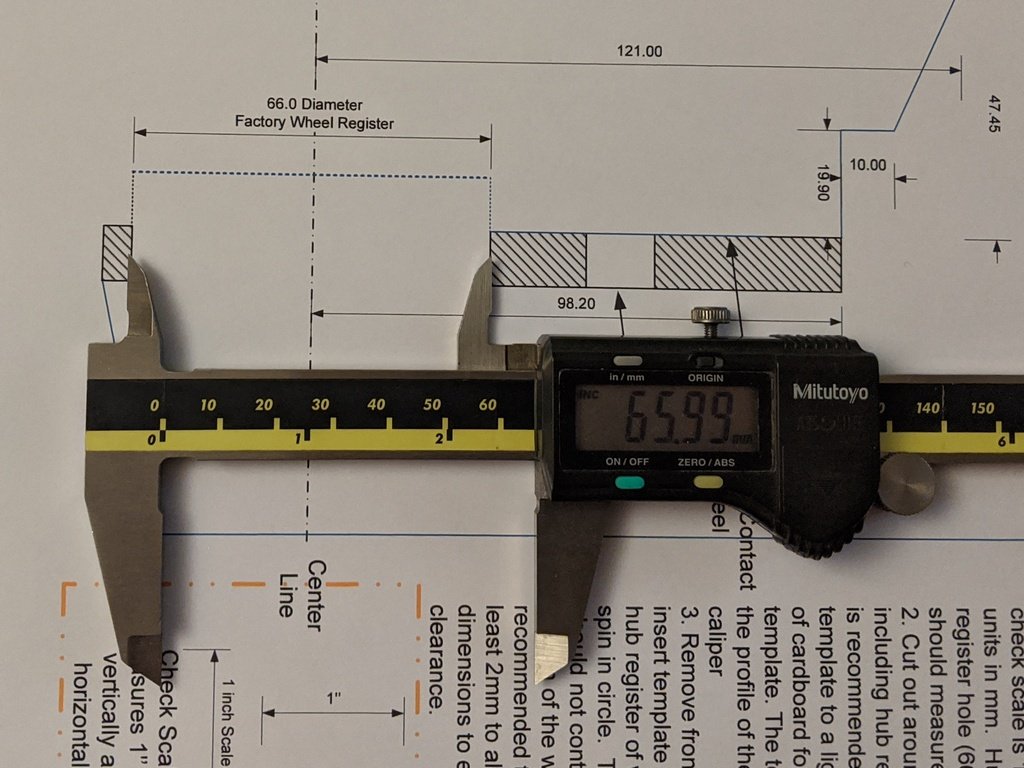
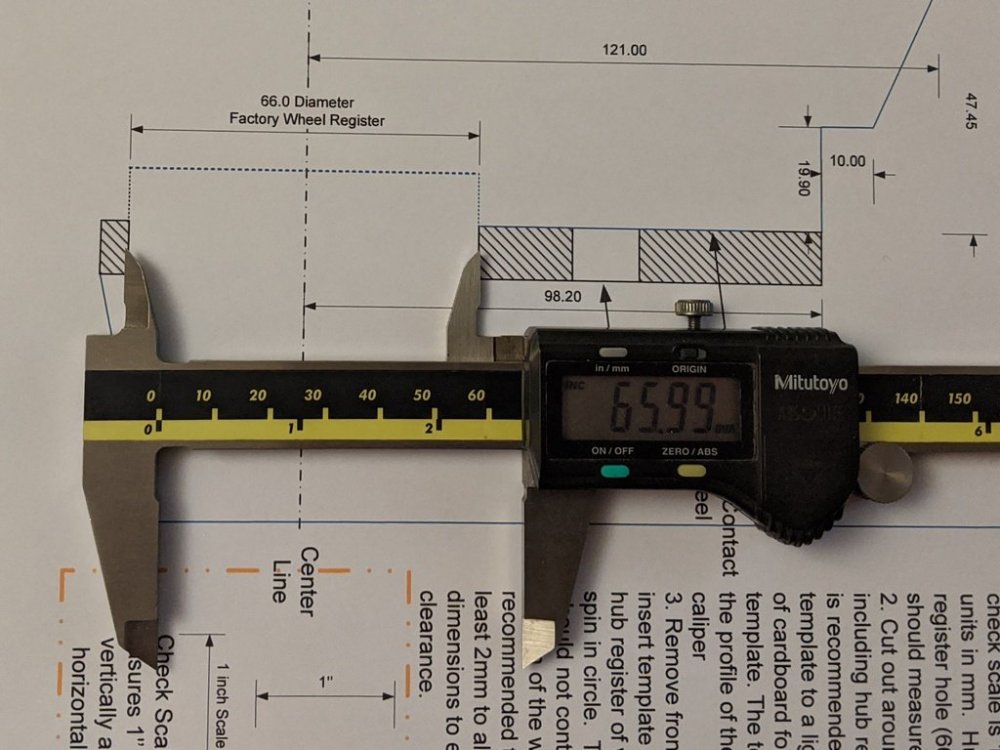
Just printed the template using "Actual size" scale on my Canon printer and it is pretty much spot on.
-
Just an FYI, CZP (and Z1) publish templates for the front and rear Akebono BBKs which will make it much easier to see if the kit will fit a particular wheel. Akebono Front Template.pdf Akebono Rear Template.pdf
-
Do you want OEM?
-
Just to add, that if you do go for that supplier make sure that he knows it is for 2+2. The picture above was what was left over with very minimal wastage!
-
This a photo of a leftover piece. I should have posted that rather than the misleading photo above. The match is spot on.

-
I bought mine from the States as I couldn't find a supplier here with a good match to OEM: https://www.ebay.co.uk/itm/300ZX-TURBO-NISSAN-LOWER-STRIPES-1990-1997-300-ZX-2-2/152023851841 http://www.twinturbo.net/nissan/300zx/forums/general/view/1992598/Nissan-vs-eBay-pinstripe-ltunbelievably-long-lolamgt.html Picture below missing from above TT.net link - Nissan OEM on left, eBay on right.

-
Just an FYI for you: http://specialtyz.com/blog/?page_id=178
-
In the first instance check the plug contacts/resistor tails for corrosion. It is also possible the IMΩ resistor has failed (in the heat).
-
That can depend on the carrier used. From past experience some will hold the goods in the UK and send you an invoice letter, whilst others send the invoice letter independently of delivering the goods. What paper work came with the goods?
-
What makes you think that on your car the Detonation sensor signal wire is Brown? The factory wiring diagrams show White (pin 23 ECCS connector) This is a coloured ECCS diagram to help you. ECCS_colored_m.pdf