





Everything posted by AndrewG
-
Well I watched all of that live from the safety of my CHAIR! Congratulations to Felix and all the team. -Andrew
-
This is the part of the installation quide I have for an EVC 4 which covers the valve body install (including filters). The valve bodies are similar if not the same for both marks. The filters are HKS 4599-RA017 4mm filter and HKS 4599-RA016 6mm filter. -Andrew
-
Never heard of that happening. I would be more concerned about debris entering the unit and damaging the stepper motor functionality. It is a precise and efficient design and is very good at holding a steady boost and catching boost spikes as they occur. -Andrew
-
You seem to be missing the two in-line air filters for the valve body. They should be fitted within 10cms of the valve. You can see them in the picture I put in the Garage section along with the valve placement chosen to keep the hoses as short and equal as possible. -Andrew
-
If your discs have curved cooling vanes, then the discs themselves are directional and should be installed with the cooling vanes running back from the inside to outside diameters in the direction of rotation. -Andrew

-
I bought a McGard kit for the Blitz wheels: M12 x 1,25 - 20 NUTS/SET WITH WHEEL LOCKS 13/16 MM PART NUMBER 65554 http://www.mcgard.com/Applications/AutomotiveSearch/default.aspx?QToK=k%2fL5ZSDUuoLEwFxLKL6QeA%3d%3d -Andrew
-
For the R33 Brembo setup - the standard Z32 short brake line (caliper to flexible brake line) will fit the Brembo calipers. You will need to slightly reshape the line as the Brembo caliper sits further out from the axle then the OEM caliper (~22mm). -Andrew
-
This is the circuit diagram for the Bose system (individual amps in the speaker boxes). -Andrew el73.pdf
-
Tesco supermarket, Sizer Way, Applemore between 8am and 8:30am seems to be the suggestion. -Andrew
-
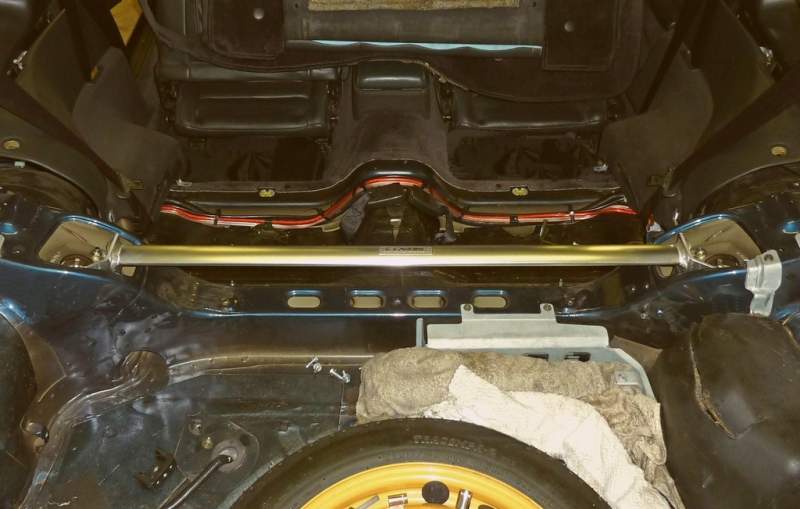
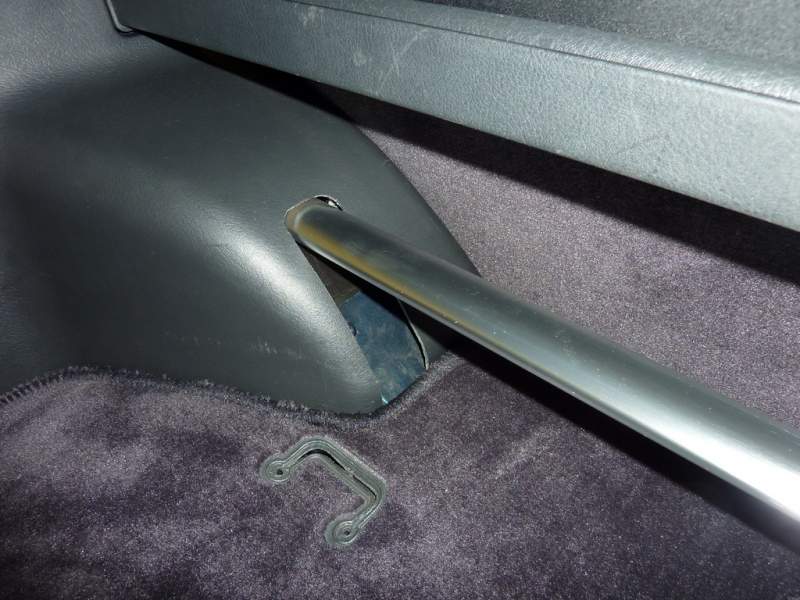
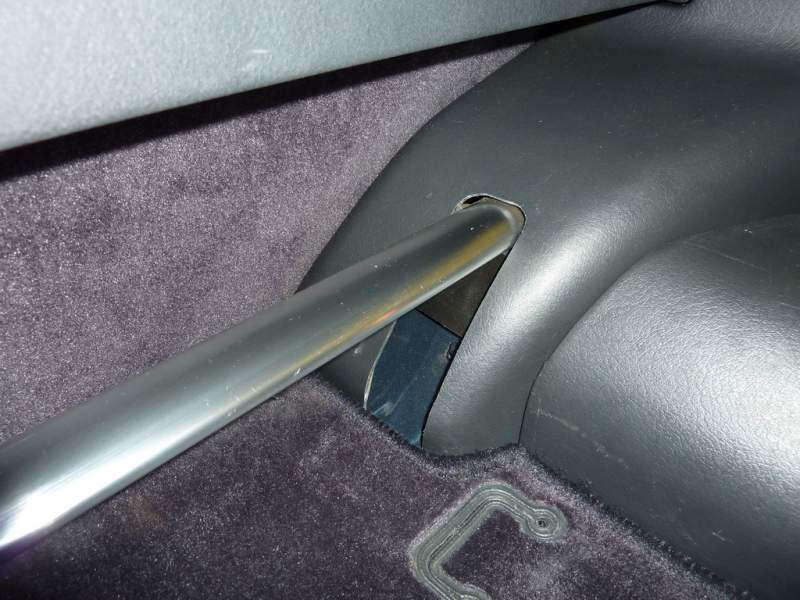
Pics for you. I got the cut right by using another spare trim and roughly cutting out enough material so that the trim would sit fixed in place with the strut fitted. I then made up a thick paper template stuck to the trim to get the exact cutting lines. The opposite side is a mirror so just transferred the final cutting lines over. The slots are now blanked off with some of that padding material that you find behind the boot trim panels. The strut didn't come with a template. You are welcome to take measurements at Beaulieu. -Andrew
-
I've had a w211 53 plate e270cdi Avantgarde estate for about two years and now a 55 plate e320 cdi sport estate for the last year. The post facelift w211 56 plate onwards is the one to go for, as MB fixed a lot reliability issues (mostly electrical). I've has no big problems so far, but then I may have been lucky. I take mine to an independent MB garage to avoid the very high hourly rates of the main dealers. The e320 is well built and nice to drive. The V6 is very smooth, quiet for a diesel and pulls like a train. I get 38+ mpg on fast long runs. -Andrew
-
Latest information on revisions to Selin translator due to HID ballast interference: http://www.twinturbo.net/nissan/300zx/forums/general/view/2498793/OFFICIAL-UPDATE-Heres-where-things-are-as-of-today.html -Andrew
-
The car was UK registered 18-05-94 and ends with 0011119. -Andrew
-
I would prefer to meet up at the pub and then convoy and park together. I'm happy to pay on the gate, if that simplifies things. -Andrew
-
I'll come along to this event. -Andrew
-
I fitted a Selin Dual MAF Translator and dual intake elbow kit along with a pair of HKS filters in the car. The setup replaced the single MAF and HKS filter setup I had before. I had to make no changes to the ECU in order to use the Selin, it is a plug and play upgrade. You can read about the Selin kit here: http://www.selindesign.net/electronics.html The install was pretty straight forward and took about 2 hours to carry out. I have to say I was pleasantly surprised at the results. The car picks up much quicker than before, with faster throttle response and better acceleration. You can read more from Greg Dupree from Specialty-Z here: http://www.twinturbo.net/net/viewmsg.aspx?forum=general&msg_id=2416119 Getting rid of the restrictive intake T piece which has each bank of cylinders fighting for air seems to be the key and you can see the sort of gains that are being reported on dynos with the Selin setup. The picture shows the install of the Selin Translator, dual intake elbow kit along with the HKS filters (the black box with blue silicon pipes is part of the HKS EVC). -Andrew
-
Here: http://www.300zx-twinturbo.com/tech/index.html -Andrew
-
Without Knowing the diameter and thread pitch, is this the type? http://porschecalipers.co.uk/produkty/1/bleed_screw_for_brembo_calipers_.html -Andrew
-
and another:
-
There you go:
-
The feature is described in my UK Owner's manual, but is not fitted. -Andrew
-
D2 Vehicle Services in Rochester, Kent. Darren is a master mechanic on Z32's. -Andrew
-
Couldn't agree more! -Andrew http://i1209.photobucket.com/albums/cc396/agg32/300ZX/Car/P1000079.jpg
-
If you have an electric drivers seat then there is a permanent live supply going to it. -Andrew
-
This is an example done with chrome spray paint applied to the internals of the housing. -Andrew

