





Everything posted by AndrewG
-
On what?
-
Euro spec in Germany:
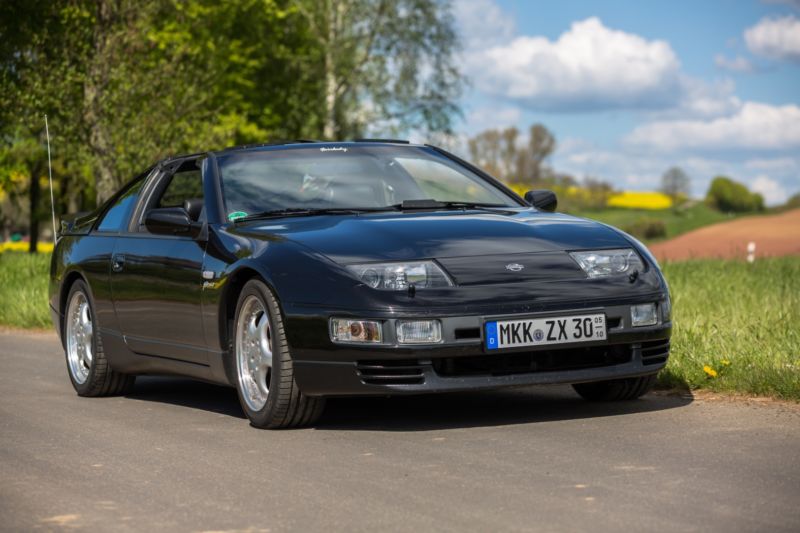
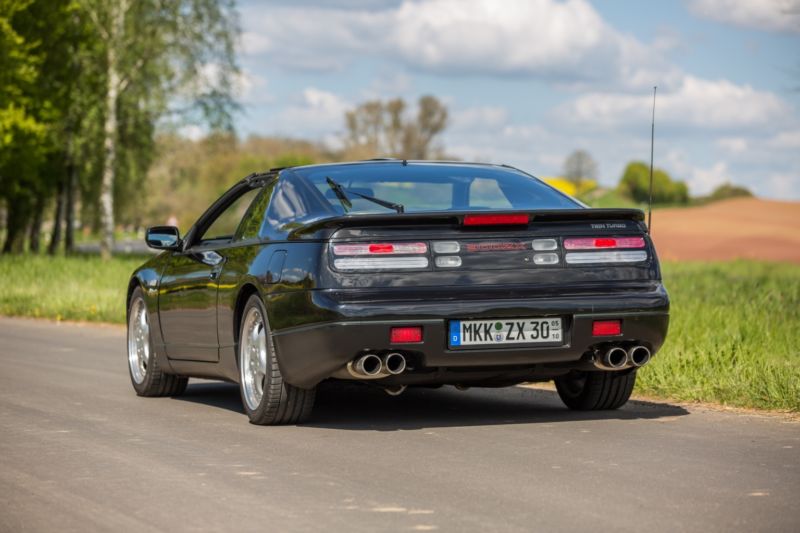
-
"Avoid eBay 'new' MAFS which are far east rubbish" in no way implies ALL products from the far east are rubbish. And they are rubbish - they don't work properly and fail early.
-
You'd better get Oscar's permission first!Avoid eBay "new" MAFS which are far east rubbish. http://www.twinturbo.net/nissan/300zx/forums/general/view/2421037/you-can-identify-counterfeits-by-the-sensor-element.htmlI've used this product with success: http://www.frost.co.uk/frost-ali-clean-alloy-aluminium-castings-cleaner.html Plenum came up very clean and bright.Lower ball joint failing (do you have those on a Vectra?). The symptoms you describe are the same as I have had on my MB E320 - they are under a lot of stress and are very exposed to the elements.Lower ball joint failing (do you have those on a Vectra?). The symptoms you describe are the same as I have had on my MB E320.I have the Toad Ai606 installed - CAT 1 alarm and immobiliser with additional microwave internal sensor for when the targas are off. The model has been on the market for many years and has been a reliable system for me.You can do it like this with the stock metal brackets: http://www.300zx.co.uk/forums/showthread.php?170960-Tweeter-Pods&p=1752974&viewfull=1#post1752974 Depending on the speaker, you may also need to remove metal around the mounting bracket area which the speaker frame passes through to get the speaker to sit properly on the ring. Agreed and this was my approach by mounting the tweeters in the mirror sail panel: http://www.300zx.co.uk/forums/showthread.php?170960Looking forward to seeing you and your car again Nick.Quite a transformation and journey!The Z1 website gives "Assembled as a complete unit, the covers are not seperable from the airbag itself." Of course that may be Z1 playing safe. https://www.z1motorsports.com/air-bag-sensors-and-control/used-nissan/used-driver-side-airbag-with-cover-p-4118.html Do you want the '96 FSM pages which cover the Airbag system? It covers the safety aspects of handling the airbag assembly - in particular not storing and handling the airbag in the "face down" position. In the event of accidental deployment it would turn the steering wheel into a projectile, sending it up towards the person handling it. As Andy says, not connecting the airbag connector is perhaps the easier way. Can the two pins in the airbag connector be shorted together to remove the chance of an electrical discharge setting off the airbag? The steering wheel cover has "SRS Airbag" on it. What would an MOT tester make of that as far as the warning light function at start up?An aide-mémoire:
 Welcome back James! Hope to see your new Z32 in the metal one day.Form completed.Garrett have explained in their paper the reasons why they use water cooling in their turbochargers. The turbos Nissan chose for Z32s 25 years ago were designed to have water cooling and Nissan incorporated water cooling for them. That's good enough for me.This paper was published by Garrett regarding water cooling of their turbos. Garrett_White_Paper_01_Water_Cooling.pdfI think you will be disappointed with the GHK in that department! However you will get "Pssst Pssst" when they work so maybe all is not lost.Any CF/metal joint will fail if it is not correctly prepared during manufacture. This is the type of soft failure I mean: From the manufacturer quoted in the SCC article I posted above. If you scroll down to the "Performance Tested" section you can see the levels of testing undertaken before their driveshafts fail which for the CF tube and joints is well above the failure points of the metal UJ's. http://www.acpt.com/Products/Composite-Driveshafts.aspx
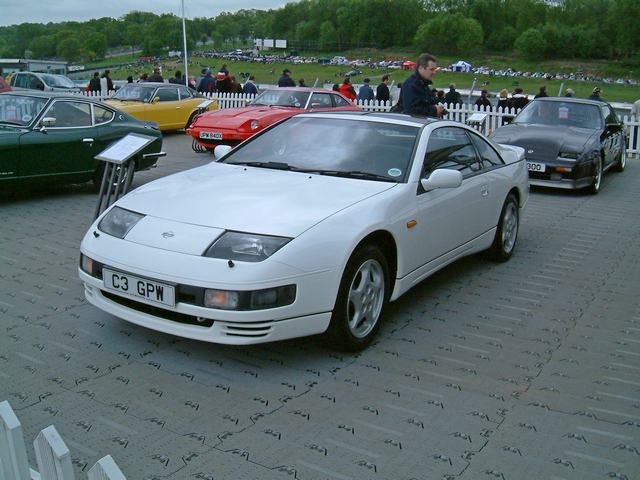
 That will be Paul Willetts's car. This photo was taken back in '03 at Brands Hatch:
 Project 300ZX in the Sport Compact Car magazine (Sept. 2002) published their reasons a for going with a CF driveshaft. Admittedly they were working on a car that went over 600hp, but their reasoning also applies to lower power cars. http://www.superstreetonline.com/how-to/project-car/0008scc-project-nissan-300zx-part-6 (Scroll down to - Other Stuff: ACPT Carbon Fiber Driveshaft) I like the "soft failure" mode of CF - I remember seeing a photograph of a single piece metal propshaft that had failed and literally punched a hole into the passenger cell.



Important Information
Account
Navigation
Search
Configure browser push notifications
Chrome (Android)
- Tap the lock icon next to the address bar.
- Tap Permissions → Notifications.
- Adjust your preference.
Chrome (Desktop)
- Click the padlock icon in the address bar.
- Select Site settings.
- Find Notifications and adjust your preference.
Safari (iOS 16.4+)
- Ensure the site is installed via Add to Home Screen.
- Open Settings App → Notifications.
- Find your app name and adjust your preference.
Safari (macOS)
- Go to Safari → Preferences.
- Click the Websites tab.
- Select Notifications in the sidebar.
- Find this website and adjust your preference.
Edge (Android)
- Tap the lock icon next to the address bar.
- Tap Permissions.
- Find Notifications and adjust your preference.
Edge (Desktop)
- Click the padlock icon in the address bar.
- Click Permissions for this site.
- Find Notifications and adjust your preference.
Firefox (Android)
- Go to Settings → Site permissions.
- Tap Notifications.
- Find this site in the list and adjust your preference.
Firefox (Desktop)
- Open Firefox Settings.
- Search for Notifications.
- Find this site in the list and adjust your preference.