



Everything posted by RichardS
-
Indeed - great club spirit....!! Well done fellas, Richard:thumbup:
-
Congratulations to you and your better half Lee; she is certainly a credit to you both!! Richard:cool2:
-
Hi Rich, I have just checked, and your e-mail addy does indeed match that on our records; and your profile is the same.... Plus I have edited your details off the open forum to protect you from the spammers!! If you are having any forum issues, then Jaikai will be best at sorting them for you mate. Richard:cool2:
-
Welcome back Richard - what was your previous username; and what e-mail address did you last register under? Let us know and we'll try to fix/update it for you mate..... Although if you don't (understandably) wish to disclose personal details on the forum, drop me an e-mail on richardsmith(at)300zx.co.uk Cheers, Richard:cool2:
-
Exactly what Gary said..... .....And welcome to the club from me, Harvey!! Richard:cool2:
-
Last summer.... ...Hell Dean, you have only had your latest car 5 minutes mate!! Thanks for your continued support though - much appreciated my friend, Richard:thumbup:
-
Many happy returns Lee..... Richard:thumbup:
-
Not bad Gaz - a bit "blingy" for my taste but nice wheels nonetheless!! Richard:cool:
-
Hi Midlands members! I'd like to announce the appointment of a new Regional Events Organizers for your area. JeffTT and JamieZW have stepped down owing to work committments; so it is with pleasure that Vodkashots and I introduce Noz (Noel) as the new REO with immediate effect. On behalf of The Committee, I'd like to thank Jeff and Jamie for all their efforts to date; and congratulate Noel on his new role within the club. Richard Smith Club secretary For The Committee
-
It is indeed mate!! Richard:thumbup:
-
10/10 matey.......:cool: Have a great day mate. I have no ZX until JUne 15th, so it won't be coming on hols next weekend.....:sad: Still as Julia is having a day in London shopping, I think I'll wash and wax the Merc. It'll take my mind off missing my ZX...... That and the money Julia will probably be spending......:lol: Richard:chef:
-
Excellent Lee - I must take a look at that mate......:cool:
-
Of course matey...:thumbup:
-
LOL - brilliant....:rofl:
-
Hi Ian, No mate - he's pretty booked up at the mo; and the a/c needs to be sorted by his specialist - so I have left it there for a couple of weeks as I'm on hols shortly...:wink: Richard:chef:
-
Welcome back Rob - and thanks for your support mate!! Richard:thumbup:
-
Not seen the ad myself - but I'd certainly have one!! Richard:devil2:
-
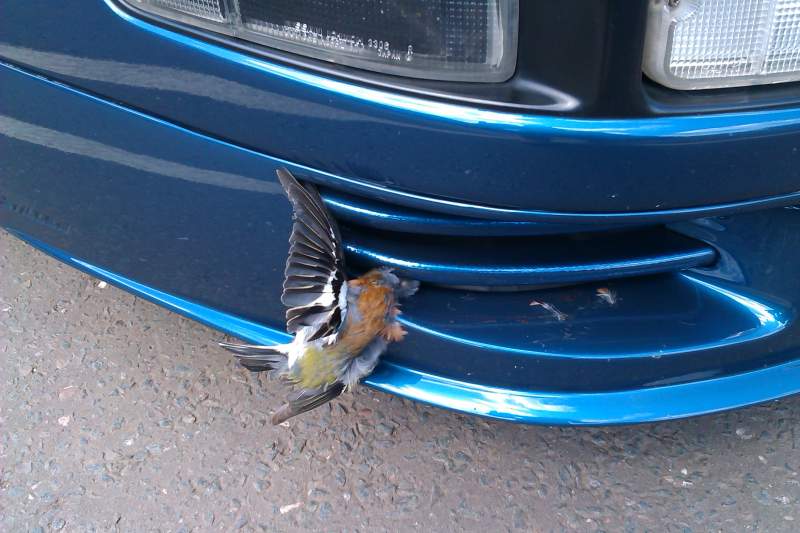
LOL; No comment Gaz....:wink: I didn't have a clue to be honest - and it wasn't there when I stopped to refuel at Warwick services so it happened in the last 20 miles of the trip... Richard:online2long:
-
Still looking good though Ian......:thumbup:
-
Noooooo!
-
That looks pretty good Terry - enjoy it matey; and have a great birthday!! Richard:thumbup:
-
I guess my ZX must have been a bit peckish on the way up to Zedworld this morning - as it endulged in a little snack along the way.... .......I only spotted it as I was walking off to the station. Sorry Jeff; I didn't mean to leave it for you mate...:blushing: Richard:oops:
-
Heh heh - me too Lee....:wink:
-
Dropped it off at Zedworld....:wink:
-
Many happy returns Terry - have a great day mate!! Richard:happybday:
