Everything posted by AndrewG
-
 They seem pretty robust and reliable. However this is a simple test (by Brett Demsey, BDE Goose Honk Killer maker): http://www.twinturbo.net/nissan/300zx/forums/main/view/827245/Easiest-way-to-check-if-they-are-workinggtgtgt.html
 -
Just pulling your leg! I've never seen otters in the wild, so just reading about a sighting is wonderful.
-
I get corrupt file. This is turning out like a "the one that got away" story!
-
Are you using LEDs?
-
Personally I would avoid chinese made ballasts altogether. The experience Jim Selin found in tracking down the problem with early Selin dual Maf translators and HIDs would put me off using them whether or not you had one of his translators. "All of the Chinese sourced ballasts I was able to test sent voltage spikes into the cars electrical system as high as 300 volts (!!!) This is also repeatedly hitting every other computer in your system." - Jim Selin http://www.twinturbo.net/nissan/300zx/forums/general/view/2579166/Hey-Greg-sorry-I-hadnt-replied-to-your-email-yet.html and his original diagnosis and observations: http://www.twinturbo.net/nissan/300zx/forums/general/view/2498793/OFFICIAL-UPDATE-Heres-where-things-are-as-of-today.html
-
^^Thanks for the info!
-
A bit more research suggests ~180 lbs http://www.twinturbo.net/nissan/300zx/forums/general/view/1658377/Re-weight-of-automatic-transmission.html
-
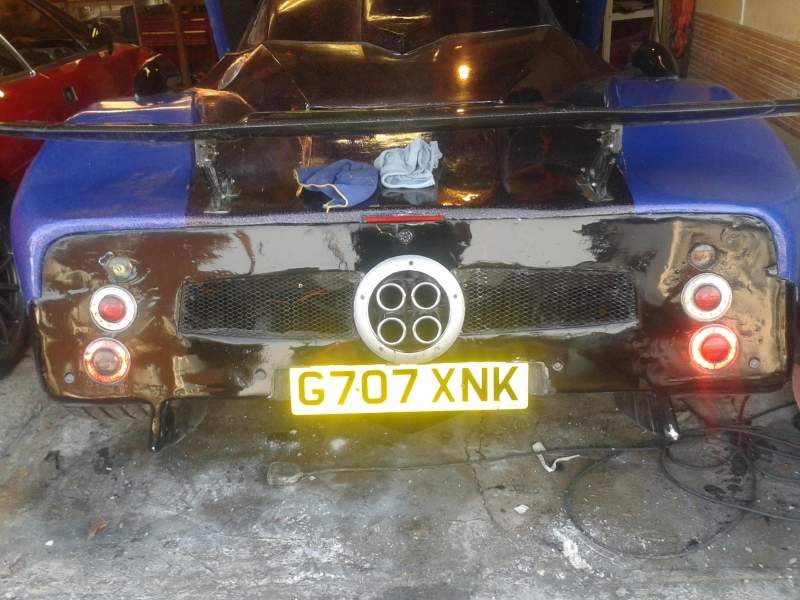
If I'm not mistaken the Dino is in this shot parked next to it. Work that one out!
-
Scroll down to item 10: http://nissan4u.com/parts/300zx/el_z32/1990_1/type_2/power_train/auto_transmission_and_transaxle_and_fitting/
-
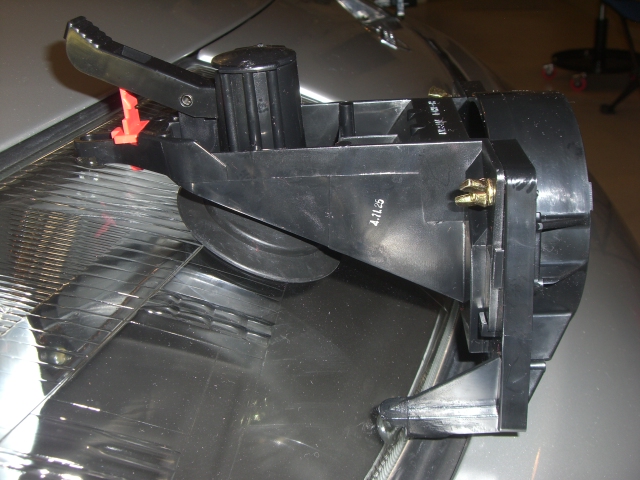
The nipples are for the headlight aiming tool: http://www.twinturbo.net/nissan/300zx/forums/technical/view/1092270/Utilizing-the-Headlight-Aiming-Tools.html
-
How will you maintain the structural integrity between the rear strut towers now that you have removed the "bridge"?
-
Best wishes on your Birthday!
 Assuming they are running to the stock locations, then yes. ef&ec-11.pdf
Can't be many people who still have Empegs! I am running the v2.00-beta13 kernel and v476 hijack. The link to the developer's website for Empeg Consult is dead but I have the empeg-consult-v0.03b source and bin file. I'll have to look for the setup instructions which were originally published on the dev website. The empeg forum http://empegbbs.com/ is a good starting point for all things Empeg.
Even better.
"Traditional" Inorganic Additive Technology (IAT) Ethylene Glycol base. In this country (winter) 50/50 mix with distilled water is satisfactory. I change mine every two years and get it premixed from Nissan - L248 Premix Engine Coolant/Antifreeze KE902-99945.
Really?
Assuming they are running to the stock locations, then yes. ef&ec-11.pdf
Can't be many people who still have Empegs! I am running the v2.00-beta13 kernel and v476 hijack. The link to the developer's website for Empeg Consult is dead but I have the empeg-consult-v0.03b source and bin file. I'll have to look for the setup instructions which were originally published on the dev website. The empeg forum http://empegbbs.com/ is a good starting point for all things Empeg.
Even better.
"Traditional" Inorganic Additive Technology (IAT) Ethylene Glycol base. In this country (winter) 50/50 mix with distilled water is satisfactory. I change mine every two years and get it premixed from Nissan - L248 Premix Engine Coolant/Antifreeze KE902-99945.
Really? http://www.300zx.co.uk/forums/showthread.php?172700-For-Sale-Radio-Brackets&highlight=radio+brackets *** Now sold***
Bonjourno Mario, Odometer is a mileage counter, do you mean speedometer? You need to check that the vehicle speed sensor located on the side of the gearbox is plugged in and working. The signal generated by the sensor is used by the items you have listed.
Have visited Milano many times! Sadly not for some years though. One of our favourite places was Pasticceria Marchesi on Via S. Maria alla Porta.
Buongiorno! Whereabouts in Italy are you?
Have a safe trip Tom and watch out for the penguins!
Can't see what this has to do with your back end, but with Christmas coming up...
http://www.300zx.co.uk/forums/showthread.php?172700-For-Sale-Radio-Brackets&highlight=radio+brackets *** Now sold***
Bonjourno Mario, Odometer is a mileage counter, do you mean speedometer? You need to check that the vehicle speed sensor located on the side of the gearbox is plugged in and working. The signal generated by the sensor is used by the items you have listed.
Have visited Milano many times! Sadly not for some years though. One of our favourite places was Pasticceria Marchesi on Via S. Maria alla Porta.
Buongiorno! Whereabouts in Italy are you?
Have a safe trip Tom and watch out for the penguins!
Can't see what this has to do with your back end, but with Christmas coming up...