



JaiKai
Main Committee
-
Joined
-
Last visited
-
Currently
Viewing Topic: Windshield wipers not working -
Country
Japan
Everything posted by JaiKai
-
My zed is a 96 and I can confirm it's a one piece actuator that just unplugs. Unless the previous owner snipped the cables it should just be a matter of plugging it back in. Although for it to work properly the sensor in the steering wheel still needs to be operational too.
-
Every zed i've owned has had a K&N in it, and the present zed has two !
-
Map Updated with the latest stats.
-
nope
-
So looks like a menu link cant also be a menu dropdown on the mobile version. So i have split the gallery and competition sections up.
-
Strange one but i noticed that too last night, seems an issue with the theme we are using.
-
This should be resolved now.
-
Running a fix for it now; But it might take all night
-
Seems to be a plugin issue. The files are on the server and if you use the tools the pictures can be downloaded directly.
-
Best outta five!
-
Working on it
-
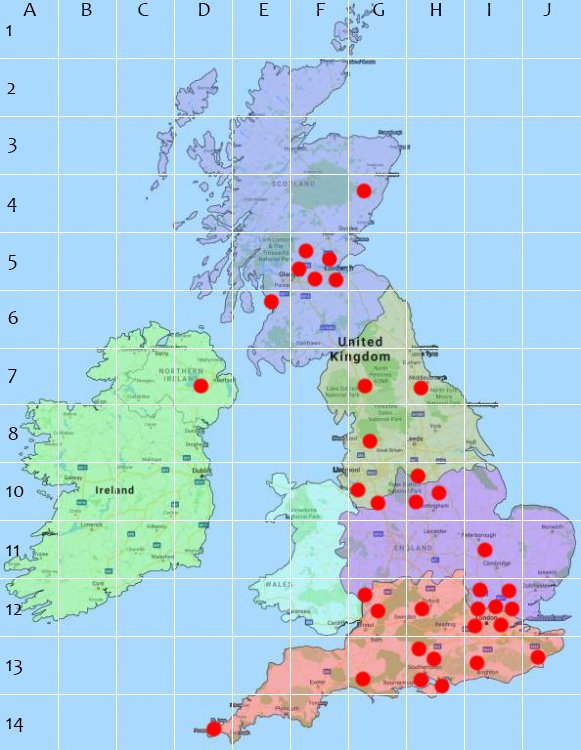
Post the grid reference from the map, not your postcode.
-
I can see the notification by email for some reason you never automatically enabled again. No worries fixed it manually.
-
I'm in E6 ?
-
Its that time again since this should have been done the start of Feb and every year i forget. The club sensus is now open. Following on from last year we have the map in a grid layout and club areas as follows : It would be great to have an accurate idea where everyone is so please feel free to also post where on the grid you are and i can do a manual calculation later.
-
Its usually automatic, how did you pay and i will look into it.
-
Sorry, But the picture upload and hosting is a feature of being a subscribed member. That's why the option does not show for you.
-
Happy Birthday Richard, all the best.
-
-

From the album: Classic Motor Show 2016
-

From the album: Classic Motor Show 2016
-

From the album: Classic Motor Show 2016
-

From the album: Classic Motor Show 2016
-

From the album: Classic Motor Show 2016
-

From the album: Classic Motor Show 2016