




Everything posted by JaiKai
-
what exactly does the error say ?
-
what you still cant send to anyone but admin or committee ?
-
Oops just posted using my secret testing account !:lol:
-
been out all day with my daughter in hospital getting a small opp, try get this fixed shortly!
-
Does seem to do that, not sure why, only happens on smaller resolution displays. ill disable it for now and fix it tonight.
-
Yeh, upgraded the pm system too ! You can now have an out of office as such on the pm system and send attachments too.
-
yip, was waiting on this thread to see it in action, kinda cool !
-
Another feature re-enabled ! We used to have this a few months ago but after a security issue it became at fault and had to be disabled. No its back and every thread will automatically refresh every 5 seconds and add on the extra threads as if by magic :sorcerer:
-
Don't really understand what you posted or have I missed something ? You give feedback to the person based on what you have purchased from them and you also post comments and a url to the for sale thread, Its nothing to do with popularity, are you looking at the post rating on each thread as that's nothing to do with this feature.
-
anyone else confirm they can see the new top menu ?
-
Unless i'm thinking of the wrong bit it was all tape (cleverly done I might say) along with black silicon
-
Was in the process of turning it on, it showing now ?
-
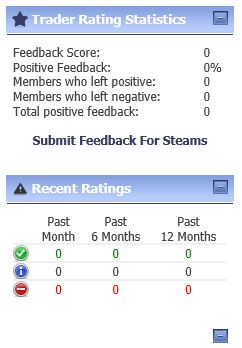
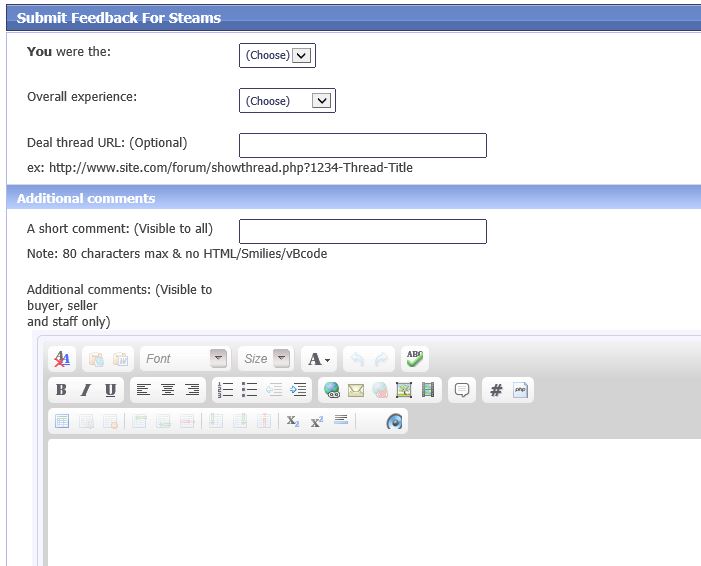
As this has been requested so many times I thought I should finally look into it. So if you haven't already noticed we have a few new extras added to the wonderful forums. Firstly uptop there is a new navigation menu called Traders as show in the pic : This will show and list current sellers and buyers (after they fill in the options) and there current feedback ratings much like ebay does. Then in the post bit under your stats we have your current feedback score with a links directly to that users feedback history : So if you've just done a deal with somebody simply goto there feedback page; then look for the "Submit Feedback for Username" link as follows : Fill in as much information as you can and provide the url to the sale then click submit in the lower right : That's it; hope you all like it and start building up trader feedback scores !


-
sorry buddy there all busted, filled in with black sealant and then there was black tape on top.
-
Do you like your neighbours and do you live miles away in a field somewhere ?
-
Two of these http://www.ebay.co.uk/itm/10-Pack-F-Plug-Connector-Sky-Satellite-Twist-On-Type-High-Quality-/160728253479?pt=UK_Sound_Vision_Other&hash=item256c268427 and one of these http://www.ebay.co.uk/itm/1-2-3-F-Type-Coaxial-Connector-Virgin-Sky-Satellite-Cable-Joiner-Coupler-Adapter-/151052488929?pt=UK_Sound_Vision_Other&hash=item232b6e10e1
-
Use satellite coax connectors for a simple connection, two f type plugs and a connector.
-
and if you take directions from steams you'll never know cos the green buttons at the top right!, click lol
-
Here you go! http://www.300zx.co.uk/forums/showthread.php?167111-Forum-Reputation-System-Explained
-
so you've reported a post three times now and saying to discuss it with committee but the posts you reported in the first place are from some of the committee. I feel your just abusing the reporting post feature for the sake of it. feel free to report this one too as it would mean I'm reporting on myself since all reported posts get posted under my name, lol
-
I took mine off and took the karcher power hose to it, then dried it out again with a hair dryer.
-
It will be up on the 24th October and as long as your profile email is up to date you should get a reminder.
-
That's a nice big list you have there, lots done already with lots more to do. you should get some pics posted and if you resub that will take care of not being able to edit your own posts.
-
-
Happy Birthday buddy.

