



Everything posted by tomomontana
-
Just went out to have a look, thought I'd give it a quick turn of the key first and..... Fired straight up without an issue. How very odd!!! bet I will go out tomorrow morning and the bugger won't start again.
-
Yeah, nothing at all. Going out into the rain to have a look in the next half hour.
-
Any chance of a photo please mate :)
-
I got literally the not so sweet sound of silence when I turned the key, no lights, no clicking.... Absolutely nothing! :( I'm hoping it is just the battery terminals, but I'll have to wait till I get home from work to find out.
-
Nope, drove it to and from work yesterday with no problems at all.
-
The car has never had a problem starting, always instantly fires up at the first turn of the key.
-
I will check the battery when I get home. but just in case that doesn't solve it,any other ideas.
-
Went to go to work this morning, got in the Zed turned the key all the dash lights came on as usual. Then turned the key the next click and.... Nothing. All the lights on the dash had gone out. Tried again and literally nothing, no dash light and no starting. Is there a fuse or relay that could have gone? Any help would be appreciated, as can't rely on a lift as my missus works random times, it was just lucky she was leaving this morning at the same time as me.
-
Hopefully it won't be a scam mate, still a bit of a strange request if not though.
-
Has he actually called you yet then?
-
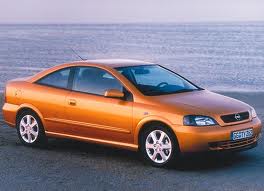
How about the old Vauxhall burnt orange/bronze
-
By the way mark, loving the new Sig pic!!! Those new wheels look amazing on your Zed!!
-
Yeah, that's pretty much what I said, and surprise surprise... No reply.
-
That's the one mate, exotikleather. I thought his account etc looked good too, but still going to approach with caution. Certainly not going to be giving out any PayPal details! Just out of interest mark and dk, what did you reply, if at all.
-
As the title states, today I had a very strange parts request. As many of you may know, I've been stripping my old Zed to help pay for my new one. But today I had the biggest and strangest request so far. Someone asked to buy the whole rear end of the car.... The boot, rear quarters, floor pan etc... Basically the whole lot. Then I noticed the buyer was from the USA, I told him I had everything he needed but thought that the postage might bit a little bit costly :). He then replied that it would actually be going to Dubai and that his brother in the UK will sort it all out. I think its blatantly a scam but also think I'll see how long I can keep humouring him for. I know other members on here are also advertising their breakers on here, so wondered if they had also received this odd message. He also send me some photos of his Zed with the back end missing, I'll try and upload them in a bit.
-
Welcome to the zedhead nation mate.
-
555, same as your injectors :)
-
Well it is now for terry :)
-
Your 30 now buddy!!! Still (reasonably) young mate.
-
Yep, just 1, tight bitch :) Anyway, happy birthday mate.
-
A for effort! all I got for my birthday was a pasty with a candle in it :)
-
Wasn't the last comment about your pink slippers :) Just looked for the photo but its now gone.
-
Good work mate. Wish I could afford a second car so I could take mine off the road and work on it.
-
If mark can't help then what about jeff at Zedworld?
-
