




Everything posted by bigh
-
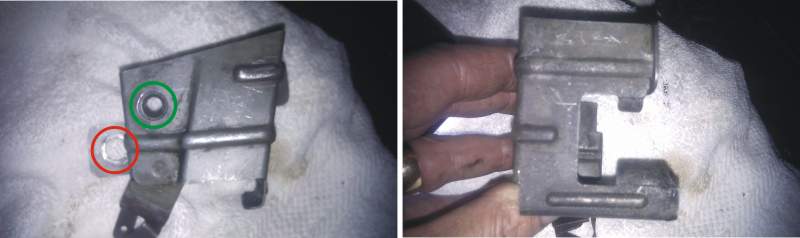
Hoping someone has their engine out with this bracket still in situ as I'm stumped as to where it goes. Fitted this bracket back onto the rear of the engine (red circle) and went to connect the main earth wire that comes up from the tranny to the green circled point, but the wire doesn't reach it about 4cm to short from connecting to the green circle point. Now I havn't done anything to the main earth wire and it's obviously not going to stretch, lol so can only assume that I have fitted the bracket in the wrong place/fixing point. Took it off so long ago can't remember and cannot see another hole available it only seems to fit 1 way because of the large water feed pipe at the back of engine. This pipe fits in the slot of shown in the right hand pic. Any pics showing correct fitting would be great guys.!
-
Without wishing to make things any worse here, what excatley does "Red fonts" refer to on this forum. Never heard it before now :ninja:
-
Right, sorted it. Numpty here put the primary feed into the Skybox into the RF socket not the RF2 socket :asshole: FWIW check your Sky account as I got this SKY+HD free (customer loyalty) apparently, arrived 2 day after I ordered and has the new Sky menu system
-
Right ordered a new SKY HD the other day set it up no problems, apart from the TV LINK. I have turned on the RF2 output and the tvlink led is now red. When I take the tv link and put it on the other TV's the LED doesn't light up. Any ideas what I'm doing wrong fellas?
-
Zed off the road atm but will come along to see all
-
That sucks big time Mark,, after all your hard work getting it finished in time aswell. Give the barstweards hell when you get to talk to them. Hope it works out for you in the long run
-
Great ad, see driving a Zed gives you awesome driving skills and you end pulling all the best looking dolls.
-
Hows about this for the best M5
-
Just googled the 300zx so 80's
-
Whats not to like about an AMG Merc.......POOOOWWWWEEERRRRR (in Clarkson voice), :gunsmilie:
-
I think "ANDYP" might be able to help with a chip, eh Andy?
-
^^^^^^ As above great read. Thanks very much for posting and keeping all the pictures aswell.
-
Looks like alot of fun, how many hours did it take to make?
-
Yuuuuuuuuuuuuuuuuuuuck!
-
I think Bob has the TWINZ rear diffuser on his car
-
lovely job, would love a garage that size. Keep us updated :tongue_smilie:
-
lovely job, would love a garage that size. Keep us updated :tongue_smilie:
-
just cover postage and a beer maybe? Just realised I don't have any decals on my car as it's a wide arch. If someone wants to give me the following dimensions I'll get them set up. Dimensions required: Cap height, and overall length of "TWIN TURBO" and the same for "NISSAN FAIRLADY Z" please
-
just cover postage and a beer maybe? Just realised I don't have any decals on my car as it's a wide arch. If someone wants to give me the following dimensions I'll get them set up. Dimensions required: Cap height, and overall length of "TWIN TURBO" and the same for "NISSAN FAIRLADY Z" please
-
Matey, if I'm making up 1 set, I'd be more than happy to do 1 for you if you want?
-
Matey, if I'm making up 1 set, I'd be more than happy to do 1 for you if you want?
-
I think they look fueking awful matey! :blink: :blink: :blink: :blink:
-
I think they look fueking awful matey! :blink: :blink: :blink: :blink:
-
I can make some up for you if want?
-
I can make some up for you if want?
