Everything posted by winnoze
-
Thanks. Sorry if I appear to have hijacked this thread.
-
There's an alarm for leaving the lights on? Getting down there first thing...had to jump start twice already, always wondered why one was never fitted lol Sent from my GT-N7105 using Tapatalk
-
I think you're 1 candle short. Have a great day Richard....
-
I was nearby so had a "is it worth the journey" visit. IMO its deffo worth a second look and I quite happily defer to you guys to give the expert once over....I told the seller to expect a call re: weekend from whoever decides to go. Car very clean and sounds fab... Sent from my GT-N7105 using Tapatalk
-
No mayo in oil cap. No targa leaks. Sent from my GT-N7105 using Tapatalk
-
No ramp in sight tho...looks clean.. Sent from my GT-N7105 using Tapatalk
-
There now. Private residence. Waiting 15mins for seller... Sent from my GT-N7105 using Tapatalk
-
Looks wicked dude. Hope to see the finished product soon.. Sent from my GT-N7105 using Tapatalk
-
Very nice! Sent from my GT-N7105 using Tapatalk
-
Where u get the brackets? Sent from my GT-N7105 using Tapatalk
-
Not being funny dude, but what about the poor unfortunates that happen to be in the way of your gymnastic zed while your safely tucked up inside.. Sent from my GT-N7105 using Tapatalk
-
Thought I replied ages ago....count me in for the weekend pleeze...
-
Hello! You're on the right forum and in the right car.
-
Fitted a new metal lock clasp to replace the broken plastic one. And now I feel epic!
-
Thanks Jeff, was hoping for a quick reply before that ominous cloud approaches..:yes:
-
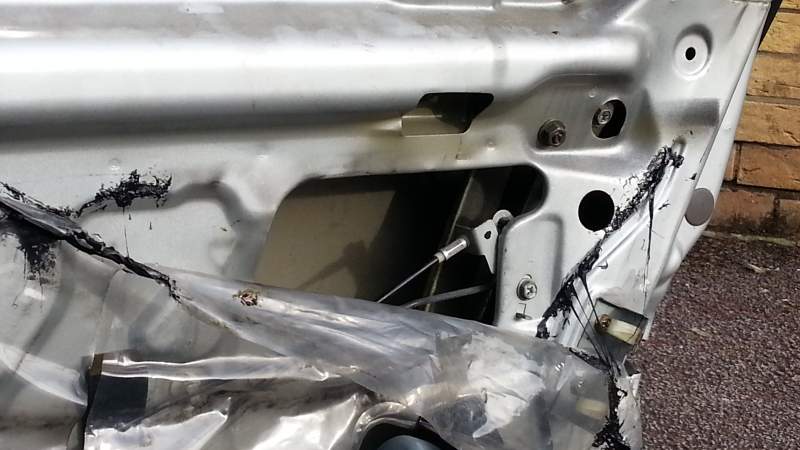
Got my new metal door lock thingamajig to replace the broken plastic one....yay! Promptly removed door card expecting to find a nice big cave to work in and was confronted with this tiny hole.I can just about see one 10mm lock screw... Can someone please tell me where I go next, as I don't want to remove contraptions I don't need to and don't believe I need to take the whole door apart.
-
Android!
-
Yep. Off work for a couple weeks, so the mrs got me going there almost daily..:hammer::hammer:
-
mine's ordered!
-
Silver one most probably me....
-
Only seen from front as passing... was nowhere really to flag down or spin around, just about managed a flash and wave. Nice Zed!
-
Thanks guys...nice pics too.
-
OK OK...pics later when i get home from work.
-
LOL....I named her Zelda. Is there another one??? so much for originality!!
-
OK, here's the thing..Zelda is very sad as since I bought her. Apart from a service and once over from Jeff, she's not had much attention. I do have plans for her, but my secret cash stash has been mullered by unexpected family emergencies etc. Can anyone recommend a decent Z knowledgeable garage in my area? I Live East London.. Need to compile a to-do list to start with. Noisy ac compressor (remove?) weird vibrations (bushes?)through to creaky sounding steering wheel . Targa leak(tried everything on the forums:headvswal). Not interested in spectacular dyno results.. ( stage 1 enough for me). I just have always loved Zeds, want a properly running Zelda with all mods being mainly cosmetic, which i can do myself. Tempted to come to a meet, but don't wanna have to park in the next street lol.