Jump to content
View in the app

A better way to browse. Learn more.

300ZX Owners Club

A full-screen app on your home screen with push notifications, badges and more.
To install this app on iOS and iPadOS
  1. Tap the Share icon in Safari
  2. Scroll the menu and tap Add to Home Screen.
  3. Tap Add in the top-right corner.
To install this app on Android
  1. Tap the 3-dot menu (⋮) in the top-right corner of the browser.
  2. Tap Add to Home screen or Install app.
  3. Confirm by tapping Install.

hi guys,


bought a zed for spare parts yesterday,


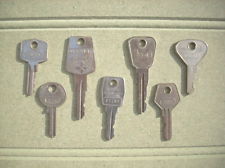
it has one weird key, anyone seen anything like it.


20121013_174631-1.jpg


20121013_174646-1.jpg

  • Replies 28
  • Views 2k
  • Created
  • Last Reply

Top Posters In This Topic

Posted Images

Featured Replies

  • Author

it's like a silver metallic type glitter behind the writing looks quite nice but feels really small like there's nothing to it, easy to get lost.


weird key for sure lol.

  • Author

was looking on the web for keys and this come up,


want one lol.


to match my zed..


l_d2hk.jpg


it's a key ring if u ain't already seen one.


where can I buy one.

  • Author
Mr nissaans special key for when he's out and needs a ride, just take any Nissan he chooses. Lol


well he ain't getting mine, I have his key now lol.

  • Author

this time next year, I have every zed on here,

cuts look pretty close to my key, doubt it would start or open all of them,


that was a joke stealing zeds if anyone's cars go missing it was not me.

it would kill me if mine was nicked.

chop there hands off lol.

was looking on the web for keys and this come up,


want one lol.


to match my zed..


l_d2hk.jpg


it's a key ring if u ain't already seen one.


where can I buy one.


I found loads of these for sale years ago, was going to buy a load and sell them but i cant remember where lol, have you tried ebay?

  • Author

do I get a brand new zed, that goes with the key.

which could not be driven cause the lost key.


then again, with what happened when I put it in my car,

looks like zeds could be 1key fits all.


I be getting a much better alarm and immobilizer now.

Jesus, I have looked all over google images for that key, even the 50th golden anniversary isn't even the one... I'd get in contact with Nissan Tez... If they give you a GTR I want one too! lol

Jesus, I have looked all over google images for that key, even the 50th golden anniversary isn't even the one... I'd get in contact with Nissan Tez... If they give you a GTR I want one too! lol


It looks like a key from the Z31, i'm pretty sure it is a Z31 key..

I'd say somebody was getting a key cut and the blanks were the same, hence a z31 or older Z key cut for a z32...

Its not a Z31 Key, possibly it's a US 280zx Turbo key, can't say for sure


It can't be a master key, a master key wouldn't be fancy looking

Weird?


I found another one of my Zed keys the other day, doesn't seem to even fit my car!!


macroZKey.jpg


must have the wrong ecu software ;)

The Z locks are piss poor, especially as they get older and the pins wear. You can usually get into most Z's with any Z key.

Anyone old enough to remember these FS type keys... back in the day any key fitted any car as the fker who took my 1600E cortina also knew:no:

fs keys.jpg

  • Author

bloody loads of replies lol,


yeah was only joking didn't think it really was a master key,


but looks cool and fits my car, so I got me what seems a rare fairladyz key.


tried it in oobumblebeeoo car and it don't fit so it was ment for me and my z lol.

Join the conversation

You can post now and register later. If you have an account, sign in now to post with your account.

Guest
Unfortunately, your content contains terms that we do not allow. Please edit your content to remove the highlighted words below.
Reply to this topic...

Recently Browsing 0

  • No registered users viewing this page.

Important Information

Terms of Use

Configure browser push notifications

Chrome (Android)
  1. Tap the lock icon next to the address bar.
  2. Tap Permissions → Notifications.
  3. Adjust your preference.
Chrome (Desktop)
  1. Click the padlock icon in the address bar.
  2. Select Site settings.
  3. Find Notifications and adjust your preference.