Jump to content
View in the app

A better way to browse. Learn more.

300ZX Owners Club

A full-screen app on your home screen with push notifications, badges and more.

To install this app on iOS and iPadOS
  1. Tap the Share icon in Safari
  2. Scroll the menu and tap Add to Home Screen.
  3. Tap Add in the top-right corner.
To install this app on Android
  1. Tap the 3-dot menu (⋮) in the top-right corner of the browser.
  2. Tap Add to Home screen or Install app.
  3. Confirm by tapping Install.

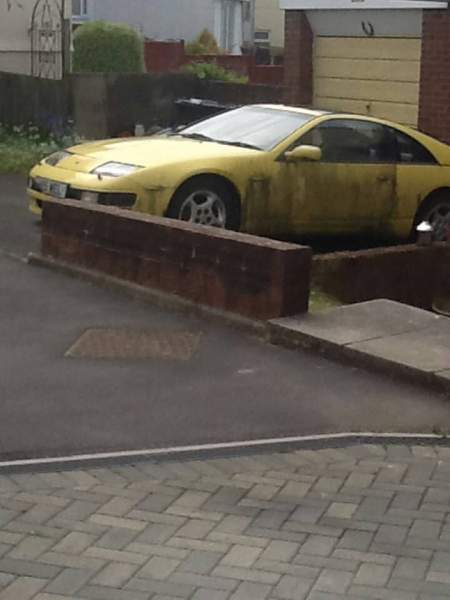
Found this in my town

All I know is there's something wrong with the engine. Ive made an offer . If I manage to get it there will be parts available! uploadfromtaptalk1399150998197.jpg


Sent from my GT-I9300 using Tapatalk

Featured Replies

that colour was the very 1st z32 i ever saw pulling out of a Nissan dealership with trade plates in the mid 90,s...i followed it in my van i was that blown away by its body form

  • Author

Hopefully I'll get it didn't know they did yellow! Would it be worth buying? Parts available?


Sent from my GT-I9300 using Tapatalk

Pearl yellow was only available on UK models for 1990 model year, so very rare (however available on Jap models until late 91). Never understood how cars like this get into such a state. If it is worth saving, I would try to, but those rear arches are probably shot.


If you buy it to break, JoelyP will have the glass!

Pearl yellow was only available on UK models for 1990 model year, so very rare (however available on Jap models until late 91). Never understood how cars like this get into such a state. If it is worth saving, I would try to, but those rear arches are probably shot.


If you buy it to break, JoelyP will have the glass!


Haha that was my first thought!

Join the conversation

You can post now and register later. If you have an account, sign in now to post with your account.

Guest
Unfortunately, your content contains terms that we do not allow. Please edit your content to remove the highlighted words below.
Reply to this topic...

Recently Browsing 0

  • No registered users viewing this page.

Important Information

Terms of Use

Account

Navigation

Search

Configure browser push notifications

Chrome (Android)
  1. Tap the lock icon next to the address bar.
  2. Tap Permissions → Notifications.
  3. Adjust your preference.
Chrome (Desktop)
  1. Click the padlock icon in the address bar.
  2. Select Site settings.
  3. Find Notifications and adjust your preference.