Jump to content
View in the app

A better way to browse. Learn more.

300ZX Owners Club

A full-screen app on your home screen with push notifications, badges and more.

To install this app on iOS and iPadOS
  1. Tap the Share icon in Safari
  2. Scroll the menu and tap Add to Home Screen.
  3. Tap Add in the top-right corner.
To install this app on Android
  1. Tap the 3-dot menu (⋮) in the top-right corner of the browser.
  2. Tap Add to Home screen or Install app.
  3. Confirm by tapping Install.

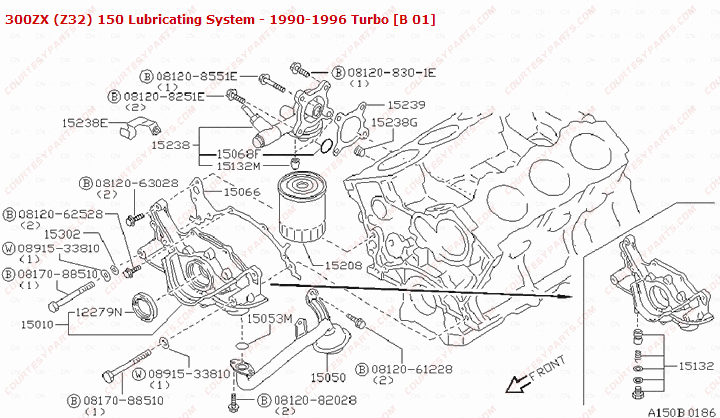
So I've had a pesky oil leak for some time now, it's got to be dealt with. Sadly it's in just about the worst place possible, the oil filter tree. So today I started, I've learnt a few things already.

It's damn near impossible to remove the top bolt of the starter motor without a 1/2" UJ, I say damn near, I did manage it.

Next up the top two down pipe bolts also require a 1/2" UJ (guess what I'm off to halfords for tomorrow afternoon)

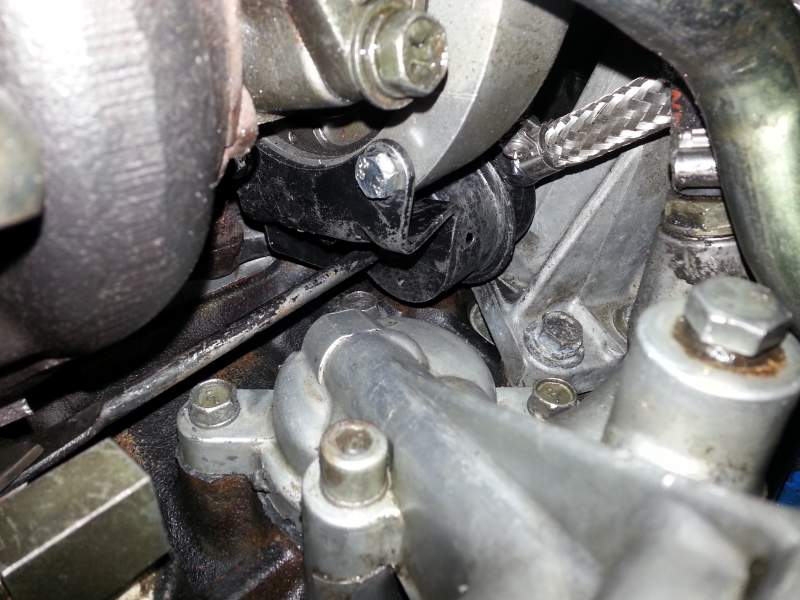
In summary, the actuator arm completly blocks the top bolts of the filter tree, and the bolts to remove the actuator are also in a PITA location, hopefully removing the water pipe will allow access.


Found this worrying oil deposit though...I immedidately thought turbo failure, however I seem to remember that the turbo can't leak like that. So I assume it's from the other leak, but I dunno....

image_zps05b75c19.jpg

  • Replies 53
  • Views 3.3k
  • Created
  • Last Reply

Top Posters In This Topic

Posted Images

Featured Replies

  • Author

:clap:

Got it back running tonight, no leak. Obviously I can't say it 100% till I load test it but so far so good.

Nice one.

Pleased for you, not only do you get to the show, but hopefully in your Zed.

Result mate.

So do you think it was down to the length of the bolts then?

  • Author

Got to have been, he too right wasn't even compressing the gasket before bottoming out. There's still bits to do before Saturday, I've currently got no front ARB

Join the conversation

You can post now and register later. If you have an account, sign in now to post with your account.

Guest
Unfortunately, your content contains terms that we do not allow. Please edit your content to remove the highlighted words below.
Reply to this topic...

Recently Browsing 0

  • No registered users viewing this page.

Important Information

Terms of Use

Configure browser push notifications

Chrome (Android)
  1. Tap the lock icon next to the address bar.
  2. Tap Permissions → Notifications.
  3. Adjust your preference.
Chrome (Desktop)
  1. Click the padlock icon in the address bar.
  2. Select Site settings.
  3. Find Notifications and adjust your preference.