Jump to content
View in the app

A better way to browse. Learn more.

300ZX Owners Club

A full-screen app on your home screen with push notifications, badges and more.

To install this app on iOS and iPadOS
  1. Tap the Share icon in Safari
  2. Scroll the menu and tap Add to Home Screen.
  3. Tap Add in the top-right corner.
To install this app on Android
  1. Tap the 3-dot menu (⋮) in the top-right corner of the browser.
  2. Tap Add to Home screen or Install app.
  3. Confirm by tapping Install.

Brakes went and my 300 went off the edge of a 20 foot drop :(

  • Replies 34
  • Views 1.3k
  • Created
  • Last Reply

Top Posters In This Topic

Posted Images

Featured Replies

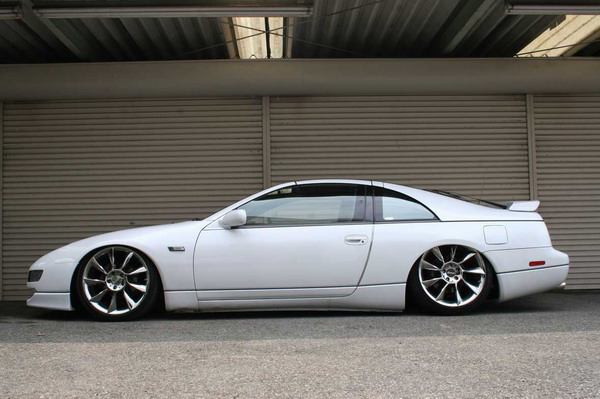
i dont think it really suits the Z, or any other non-euro car to be honest, by that's just my opinion.


PMSL @ Si's chop! :rofl:

Looks fookin' ridiculous. Slammed cars or ones with airbag suspension just look dumb. Like they have tired out old springs. It's pointless and looks like ass.


That white Z is ruined sat at that height.


I agree. Lowered to maybe supercar ride height is ok (although not that practical in England with all the speed bumps) but that low just looks stupid. Looks like all 4 shocks and springs have died.


Peter

Looks fookin' ridiculous. Slammed cars or ones with airbag suspension just look dumb. Like they have tired out old springs. It's pointless and looks like ass.


That white Z is ruined sat at that height.


Yeah, I agree


White Zeds look shee-ite anyway!


Difficult to make it look worse , but they succeeded hey?


:w00t:

No I dont , changed my mind:no:, wheels are nice though


attachment.php?attachmentid=55387&stc=1&d=1280860278


That really does look utter crap with the back end sagged down like that. Pointless and rubbish.


3345009834_c3eaf1624d.jpg

Edited by FunkySi

Join the conversation

You can post now and register later. If you have an account, sign in now to post with your account.

Guest
Unfortunately, your content contains terms that we do not allow. Please edit your content to remove the highlighted words below.
Reply to this topic...

Recently Browsing 0

  • No registered users viewing this page.

Important Information

Terms of Use

Configure browser push notifications

Chrome (Android)
  1. Tap the lock icon next to the address bar.
  2. Tap Permissions → Notifications.
  3. Adjust your preference.
Chrome (Desktop)
  1. Click the padlock icon in the address bar.
  2. Select Site settings.
  3. Find Notifications and adjust your preference.