Jump to content
View in the app

A better way to browse. Learn more.

300ZX Owners Club

A full-screen app on your home screen with push notifications, badges and more.

To install this app on iOS and iPadOS
  1. Tap the Share icon in Safari
  2. Scroll the menu and tap Add to Home Screen.
  3. Tap Add in the top-right corner.
To install this app on Android
  1. Tap the 3-dot menu (⋮) in the top-right corner of the browser.
  2. Tap Add to Home screen or Install app.
  3. Confirm by tapping Install.

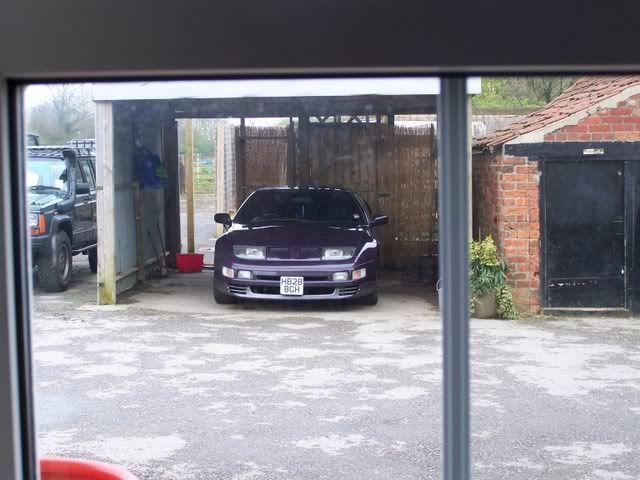
while on my pc looked up and thought god it looks good. just somthing about it. what could it be ahh yes my lovley 300. :nana2:300zx.jpg

Featured Replies

at the moment a f****ng building site from the back of the house and my 300 out of the front window

Not a lot really, my garden and workshop and the allotments and golf course behind :dance::dance:.

You have to peer out the front to see the zed which isn,t good at the mo she,s filthy :cry::cry:

IMAG0107.jpg

If you look out the back of my house you see a view similar to this. From the front, very little.


phead-docks-april08sm.jpg

If you look out the back of my house you see a view similar to this. From the front, very little.


phead-docks-april08sm.jpg


Blimey Si, Monte Carlo. Whens the Ferrari turning up ?;)

Most of the time this


ladys.jpg


unless I feel compelled to love thy neighbour and put the black one in the garage lol....

wow hope you have got triple glazed windows.


ironicly, i dont! its a listed building and has dodgy single glazed, wooden frame windows that barely fit in the hole let alone keep the noise out... were not allowed to change them :( then again... when they build the 2nd runway @ stansted, our house is being dismantled and reconstructed up the road :confused: maybe they will fit them better then?

Join the conversation

You can post now and register later. If you have an account, sign in now to post with your account.

Guest
Unfortunately, your content contains terms that we do not allow. Please edit your content to remove the highlighted words below.
Reply to this topic...

Recently Browsing 0

  • No registered users viewing this page.

Important Information

Terms of Use

Configure browser push notifications

Chrome (Android)
  1. Tap the lock icon next to the address bar.
  2. Tap Permissions → Notifications.
  3. Adjust your preference.
Chrome (Desktop)
  1. Click the padlock icon in the address bar.
  2. Select Site settings.
  3. Find Notifications and adjust your preference.