Jump to content
View in the app

A better way to browse. Learn more.

300ZX Owners Club

A full-screen app on your home screen with push notifications, badges and more.

To install this app on iOS and iPadOS
  1. Tap the Share icon in Safari
  2. Scroll the menu and tap Add to Home Screen.
  3. Tap Add in the top-right corner.
To install this app on Android
  1. Tap the 3-dot menu (⋮) in the top-right corner of the browser.
  2. Tap Add to Home screen or Install app.
  3. Confirm by tapping Install.

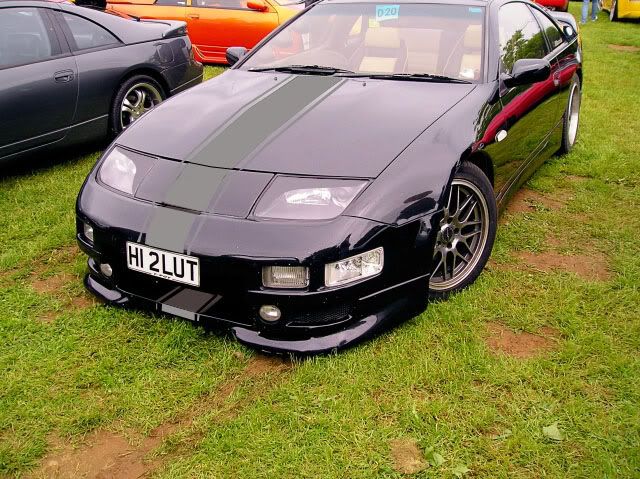
What you think to doing this stripe ?P5200066sk.jpg
  • Replies 28
  • Views 1.1k
  • Created
  • Last Reply

Top Posters In This Topic

Featured Replies

DON'TTT...Your car looks gorgeous the way it is mate. :bow:

Nay Nay Nay.


It could look OK with a slicktop, but you don't want stripes like this with a targa top.


I hope that helps you make up your mind...

I was going to go for an offset white stripe (on a blue car) just for the trip to Le Mans - it looks kinda retro. But we didn't go this year, so maybe next time.

No bloody way. Far to chav.

neigh, neigh and thrice neigh


no mate, a light stripe may look OK, i was gonna get white GT40 stipes for mine, but changed my mind at the last min.

Yeah, it was the GT40 style stripe that inspired me, but only for Le Mans.

I think you have the answer Mart'. It looks OK on a viper but not on a zed mate.


NAY WAY :eek:

no way, just doesnt look right ,

casio.jpg


NAY :D


I knew someone who had that keyboard. Brought sampling to the teen-age bedroom musician.


As far as the stripe goes, for me it doesn't work. But sod me and everyone else here, if you like it, do it. :)

Join the conversation

You can post now and register later. If you have an account, sign in now to post with your account.

Guest
Unfortunately, your content contains terms that we do not allow. Please edit your content to remove the highlighted words below.
Reply to this topic...

Recently Browsing 0

  • No registered users viewing this page.

Important Information

Terms of Use

Configure browser push notifications

Chrome (Android)
  1. Tap the lock icon next to the address bar.
  2. Tap Permissions → Notifications.
  3. Adjust your preference.
Chrome (Desktop)
  1. Click the padlock icon in the address bar.
  2. Select Site settings.
  3. Find Notifications and adjust your preference.
