Jump to content
View in the app

A better way to browse. Learn more.

300ZX Owners Club

A full-screen app on your home screen with push notifications, badges and more.

To install this app on iOS and iPadOS
  1. Tap the Share icon in Safari
  2. Scroll the menu and tap Add to Home Screen.
  3. Tap Add in the top-right corner.
To install this app on Android
  1. Tap the 3-dot menu (⋮) in the top-right corner of the browser.
  2. Tap Add to Home screen or Install app.
  3. Confirm by tapping Install.

hi guys,


bought a zed for spare parts yesterday,


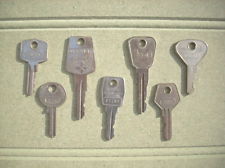
it has one weird key, anyone seen anything like it.


20121013_174631-1.jpg


20121013_174646-1.jpg

  • Replies 28
  • Views 2k
  • Created
  • Last Reply

Top Posters In This Topic

Posted Images

Featured Replies

The Z locks are piss poor, especially as they get older and the pins wear. You can usually get into most Z's with any Z key.


Pretty common, titanium keys wear out the locks even faster, as pretty as they are i wont be getting one.... titanium key into a non titanium lock = fuxxed lock.

Anyone old enough to remember these FS type keys... back in the day any key fitted any car as the fker who took my 1600E cortina also knew:no:


My old mk3 mini had keys like that, crappiest lock ive ever seen lol


Lucas also became a cuss word during ownership.

lol


Terry, picking the newly build bottom end up in a bit, answer your phone, she is all wrapped and being dropped off to yours tonight BIG MAN!

Woo, can't wait... the ACL/Wisecos should last now, going to be mad with 0 miles on the clock... just got to keep my foot from spooling up until 2k miles have passed ;)

Will use mineral oil on running in, then go semi I think.... and 100% glycol mix if the block is ok to have it?


Any tips/issues someone shout at me.......

Join the conversation

You can post now and register later. If you have an account, sign in now to post with your account.

Guest
Unfortunately, your content contains terms that we do not allow. Please edit your content to remove the highlighted words below.
Reply to this topic...

Recently Browsing 0

  • No registered users viewing this page.

Important Information

Terms of Use

Configure browser push notifications

Chrome (Android)
  1. Tap the lock icon next to the address bar.
  2. Tap Permissions → Notifications.
  3. Adjust your preference.
Chrome (Desktop)
  1. Click the padlock icon in the address bar.
  2. Select Site settings.
  3. Find Notifications and adjust your preference.