Jump to content
View in the app

A better way to browse. Learn more.

300ZX Owners Club

A full-screen app on your home screen with push notifications, badges and more.

To install this app on iOS and iPadOS
  1. Tap the Share icon in Safari
  2. Scroll the menu and tap Add to Home Screen.
  3. Tap Add in the top-right corner.
To install this app on Android
  1. Tap the 3-dot menu (⋮) in the top-right corner of the browser.
  2. Tap Add to Home screen or Install app.
  3. Confirm by tapping Install.

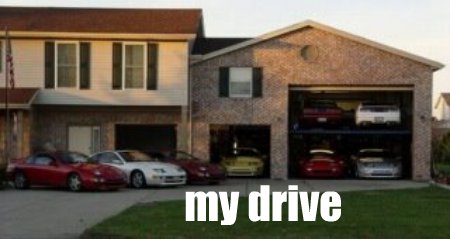
following on from Big Jims thread ..with 3 M3's and a GTr on his drive ..how much power has ever been sat on your drive and how many cars to make it...il start .....Matts M6 510bhp Turks X5 v8 sport 4.4 315BHP my ML 5.5v8 MG merc 387 BHP ( remapped ) Not too bad 1212 BHP from only 3 motors .....

  • Replies 35
  • Views 974
  • Created
  • Last Reply

Top Posters In This Topic

Posted Images

Featured Replies

Porsche 997 385bhp

300zx tt 400bhp

BMW 520d remap 200bhp


985 horses all in LOL

Mates Skyline r35 650bhp

Mates Scooby 475bhp

my Zed 350bhp

my Van 75bhp

my Mondeo 266hp


1816bhp in total ...

I wonder if i can include the petrol lawn mower to help boost the figures:lol::lol:


It would have more than the 30 on Steams' dads Almera! :lol:

ZED @ 320

530 rempap 292

ML remap 203

1980 porsche 924 Turbo.. no idea... lol...

Sons quadbike

2 electric scooters....


When you break it down like that I really need to sell something....:1eye:

Join the conversation

You can post now and register later. If you have an account, sign in now to post with your account.

Guest
Unfortunately, your content contains terms that we do not allow. Please edit your content to remove the highlighted words below.
Reply to this topic...

Recently Browsing 0

  • No registered users viewing this page.

Important Information

Terms of Use

Configure browser push notifications

Chrome (Android)
  1. Tap the lock icon next to the address bar.
  2. Tap Permissions → Notifications.
  3. Adjust your preference.
Chrome (Desktop)
  1. Click the padlock icon in the address bar.
  2. Select Site settings.
  3. Find Notifications and adjust your preference.