



- Replies 34
- Views 1.4k
- Created
- Last Reply
Top Posters In This Topic
-
Alic 15 posts
-
TheRealNips 5 posts
-
TonyB 2 posts
-
wchestnutt 2 posts




Posted Images
Featured Replies
Account
Navigation
Search
Configure browser push notifications
Chrome (Android)
- Tap the lock icon next to the address bar.
- Tap Permissions → Notifications.
- Adjust your preference.
Chrome (Desktop)
- Click the padlock icon in the address bar.
- Select Site settings.
- Find Notifications and adjust your preference.
Safari (iOS 16.4+)
- Ensure the site is installed via Add to Home Screen.
- Open Settings App → Notifications.
- Find your app name and adjust your preference.
Safari (macOS)
- Go to Safari → Preferences.
- Click the Websites tab.
- Select Notifications in the sidebar.
- Find this website and adjust your preference.
Edge (Android)
- Tap the lock icon next to the address bar.
- Tap Permissions.
- Find Notifications and adjust your preference.
Edge (Desktop)
- Click the padlock icon in the address bar.
- Click Permissions for this site.
- Find Notifications and adjust your preference.
Firefox (Android)
- Go to Settings → Site permissions.
- Tap Notifications.
- Find this site in the list and adjust your preference.
Firefox (Desktop)
- Open Firefox Settings.
- Search for Notifications.
- Find this site in the list and adjust your preference.
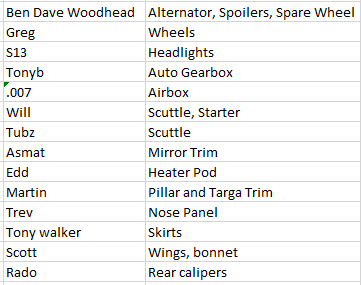
I'm doing a parts run next week, can people let me know what parts they need and ill pick them up.
Also for anyone else already asked for parts, best to remind me in case ive forgotton.
I guess this is also a 'breaking' thread
(the silver na lwb at the back is being broken)
A load of boxes and stuff out of view.