Jump to content
View in the app

A better way to browse. Learn more.

300ZX Owners Club

A full-screen app on your home screen with push notifications, badges and more.
To install this app on iOS and iPadOS
  1. Tap the Share icon in Safari
  2. Scroll the menu and tap Add to Home Screen.
  3. Tap Add in the top-right corner.
To install this app on Android
  1. Tap the 3-dot menu (⋮) in the top-right corner of the browser.
  2. Tap Add to Home screen or Install app.
  3. Confirm by tapping Install.

Hi guys,


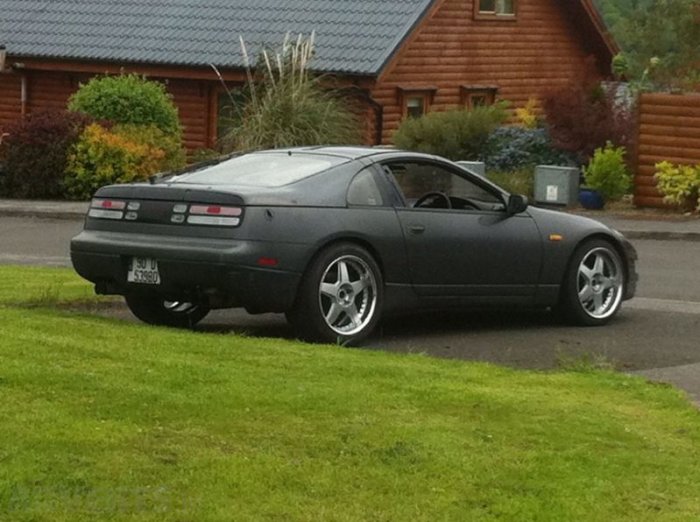
Just bought my first 300, a black JDM first imported in 98, car manufactured in 91.


It's a T-top N/A model.


She definitely needs work:

Both rear arches and door sills

Boot lid needS welding around the tail light

New seats

New spoiler.


Definitely looking forward to getting my teeth stuck in though because she runs well and drives well.

  • Replies 34
  • Views 3.2k
  • Created
  • Last Reply

Top Posters In This Topic

Posted Images

Featured Replies

Dear Mr Ikon, welcome aboard, great to see more active international interest in our UK zed club. Cheers!


The love for a car is international! As Prince song "International Lover" (google it). Says take a trip around the world... Thanks good sir

and most NAs came without spoilers?


Incorrect. ALL NAs had spoilers bar the 98+ base models and US versions.

Incorrect. ALL NAs had spoilers bar the 98+ base models and US versions.


Thats weird then, i got two non spoilered ones :lol:

You were just lucky! I think they were a delete-option, but as standard, all JDM Z32s (except the late model NAs and convertibles) came with a spoiler.

You were just lucky! I think they were a delete-option, but as standard, all JDM Z32s (except the late model NAs and convertibles) came with a spoiler.


Okay, though thinking about it it probably might have had one since the end of the tailgate doesnt quite cover the top of the lights (by about 1cm), so maybe if it had one it would fit flush.


Lol off topic again :)

Join the conversation

You can post now and register later. If you have an account, sign in now to post with your account.

Guest
Unfortunately, your content contains terms that we do not allow. Please edit your content to remove the highlighted words below.
Reply to this topic...

Recently Browsing 0

  • No registered users viewing this page.

Important Information

Terms of Use

Configure browser push notifications

Chrome (Android)
  1. Tap the lock icon next to the address bar.
  2. Tap Permissions → Notifications.
  3. Adjust your preference.
Chrome (Desktop)
  1. Click the padlock icon in the address bar.
  2. Select Site settings.
  3. Find Notifications and adjust your preference.