


99 bumper test fitting
Featured Replies
Account
Navigation
Search
Configure browser push notifications
Chrome (Android)
- Tap the lock icon next to the address bar.
- Tap Permissions → Notifications.
- Adjust your preference.
Chrome (Desktop)
- Click the padlock icon in the address bar.
- Select Site settings.
- Find Notifications and adjust your preference.
Safari (iOS 16.4+)
- Ensure the site is installed via Add to Home Screen.
- Open Settings App → Notifications.
- Find your app name and adjust your preference.
Safari (macOS)
- Go to Safari → Preferences.
- Click the Websites tab.
- Select Notifications in the sidebar.
- Find this website and adjust your preference.
Edge (Android)
- Tap the lock icon next to the address bar.
- Tap Permissions.
- Find Notifications and adjust your preference.
Edge (Desktop)
- Click the padlock icon in the address bar.
- Click Permissions for this site.
- Find Notifications and adjust your preference.
Firefox (Android)
- Go to Settings → Site permissions.
- Tap Notifications.
- Find this site in the list and adjust your preference.
Firefox (Desktop)
- Open Firefox Settings.
- Search for Notifications.
- Find this site in the list and adjust your preference.
ok its the first time the bumper had been near my car just doing some test fits the big intercoolers are now all done. i will be having ducts in the bumper were the old side lights and indicators used to be, and am doing to mod the 99 indicators and fit side lights in them with the indicators i also need to open up the bumper support bracket so the ducts can let as much air in as poss, i will be cutting louvers in the wheel wells so the air can pass right throw carbon canister rad over flow bottle and washer bottle have been removed am aiming to get the most out the coolers so have removed anything that could get in the way so you will be able to sine a light rite throw from front bumper and it will light up the tyre if that makes sense here are a few pics just for the sake of it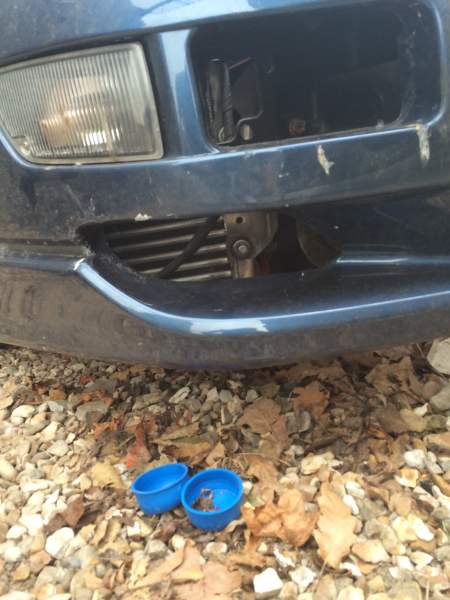
Edited by dan300zx