Jump to content
View in the app

A better way to browse. Learn more.

300ZX Owners Club

A full-screen app on your home screen with push notifications, badges and more.

To install this app on iOS and iPadOS
  1. Tap the Share icon in Safari
  2. Scroll the menu and tap Add to Home Screen.
  3. Tap Add in the top-right corner.
To install this app on Android
  1. Tap the 3-dot menu (⋮) in the top-right corner of the browser.
  2. Tap Add to Home screen or Install app.
  3. Confirm by tapping Install.

hi there everyone,


i am new to the forum and had my 300zx for some 8 months now. it is a 1992 twin turbo t-top:clap:.


Unfortunately is not all good news :sad: so in hope of a answer i came to this forum to see if any one could help me.


Yesterday i started the car and once the car warmed up a idle the rev drops up and down and up and down vice versa. Now this HAS happened to me before and it goes away it self after a bit.

However now it has gone worse :sad:


1. the car actually cuts out straight away and turns off only when the engine is warm. - happens a few times.


2. Majority of the times the revs drop so low that its like the engine is cutting out; steering cuts out, and the battery light comes on a few secs later its fine and car starts itself when i let go of the clutch. this happens alot more often than no.1.


It is pretty dangerous as it has cut out on me around corners and for 2-3secs have not been able to control/steer/brake the car.


so i am out to find solutions/suggestions to my troubled problem and thought this would be the best place.


Please any advice would be really appreciated.


thank you

  • Replies 41
  • Views 5.9k
  • Created
  • Last Reply

Top Posters In This Topic

Posted Images

Featured Replies

Oh... What's this jeff?


You did not think I was going to sit on me harris in Portugal did ya??


Jeff TT

  • Author

hi jeff,


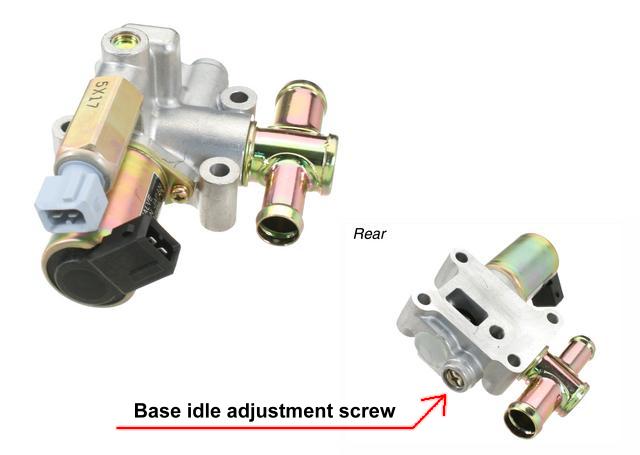
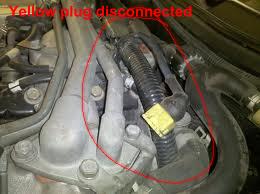
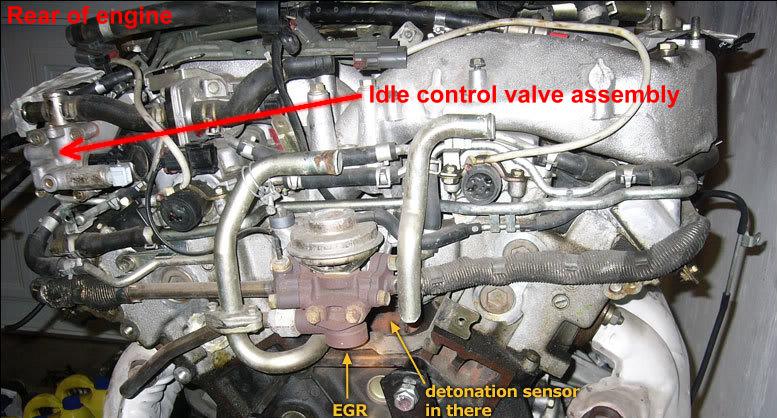
can you tell me where the yellow plug is? i know where the idle valve is, is the yellow plug on that?


thanks

You did not think I was going to sit on me harris in Portugal did ya??


Jeff TT


No bit didn't know what you'd be doing lol . Portugal is even further away for me than Birmingham lol

Membership No 0780

INSURANCE GOOFA

Datascan, Conzult, ECUTalk and a few others

I have all the rare bits you can't find :tongue::tongue:


  • Author

hi,


great news found the fault :)

it wasnt the problem jeff said it vould be, it was actually that the maf sensor area had some sort of crack. now its all fixed and ready to drive:)


atleast all the connections have been given a good look over and clean.


thank you for everyone that have taken time out to help.


just one question though...what fuse is linked to the auto folding/moving mirrors? any ideas?


thanks

And since I'm on a role. Ill guess at the right fuse being the rear window de-fogger one

Membership No 0780

INSURANCE GOOFA

Datascan, Conzult, ECUTalk and a few others

I have all the rare bits you can't find :tongue::tongue:


And since I'm on a role. Ill guess at the right fuse being the rear window de-fogger one


Mmm, I would have said it was the #4 fuse (top row) rear window wiper (10 A)... :)


(FSM EL- 9, if I'm reading it right)

Edited by Medallion Man

  • Author

hmm i actrually thought it was the defogger one. but good to see another option :)

will give them a go tomorrow.

just picked my z up from the mechanics....wooohoooo wow! its even faster than before!

what happened was water got in through the cracks. When he used the air pressure pipe near the crack a lot of water came gushing out. now its all sealed and fixed up and faster than ever! :)

  • 1 year later...
  • Author

Nope was none of the ones you suggested for the fuse. Any other ideas? Anything else that could be wrong?

Sorry i know this was a long time ago lol

Join the conversation

You can post now and register later. If you have an account, sign in now to post with your account.

Guest
Unfortunately, your content contains terms that we do not allow. Please edit your content to remove the highlighted words below.
Reply to this topic...

Recently Browsing 0

  • No registered users viewing this page.

Important Information

Terms of Use

Configure browser push notifications

Chrome (Android)
  1. Tap the lock icon next to the address bar.
  2. Tap Permissions → Notifications.
  3. Adjust your preference.
Chrome (Desktop)
  1. Click the padlock icon in the address bar.
  2. Select Site settings.
  3. Find Notifications and adjust your preference.