


-
Hi can you add me to the list mcvite-from Basingstoke thanks.
-
add me to the list please,basingstoke,thanks
-
hi howard,i was really looking forward in meeting up with you on the 28th march plus going along to the surrey rolling road on the 29th of may, but yesterday afternoon i had recieved some bad news about myself so i have togo into hospital any day now and wont be around for awhile which knocked me sideways i can tell you!!!!!. but hoping to be back on my feet middle of this year fingers crossed.so i will see you all then,martin
-
steve,thanks for everything mate!!! really looking forward in going to the nurburgring with you as promised,and meeting up with eveyone.i would just like to say thankyou to everyone in welcoming me into the club.
-
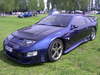
thanks andy,i think she's stunning just wonting to take it up another notch!!!.
-
just joined up on 7th march,i have just purchased steve's blue marble reg wdz 2677,i am going to add a few upgrades ie-larger pace intercoolers,hks super drager which i have managed to locate and have it modified for the n/s/r plus uprating the brakes all round,ksport 8pot calipers on the front with 356mm discs, and ksport 6pot calipers and 330mm discs on the rear.i will be joining the south central area and start to get to no a few zx guys,so realy looking forward to that,thanks everyone,martin.

View in the app
A better way to browse. Learn more.
