Jump to content
View in the app

A better way to browse. Learn more.

300ZX Owners Club

A full-screen app on your home screen with push notifications, badges and more.

To install this app on iOS and iPadOS
  1. Tap the Share icon in Safari
  2. Scroll the menu and tap Add to Home Screen.
  3. Tap Add in the top-right corner.
To install this app on Android
  1. Tap the 3-dot menu (⋮) in the top-right corner of the browser.
  2. Tap Add to Home screen or Install app.
  3. Confirm by tapping Install.

Help ! Excessive pressure, not vacuum

hi


I´m still trying to sort out the problem I’m having with the petrol tank.


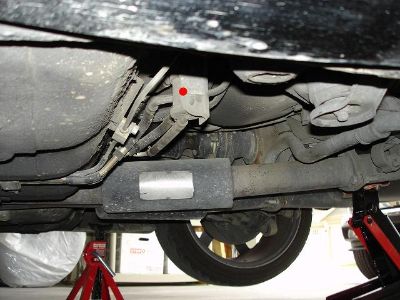
I know all about the petrol tank causing a slight vacuum through pumping the fuel and the air not being replaced entirely until the vacuum pressure opens the valve on the petrol cap to allow air in but mine is doing the opposite, when I open the fuel cap air isn´t being sucked in it’s actually being blown out, so much so that if I jam the small valve on the petrol cap open it starts to spit petrol out. How can the petrol tank be under pressure like that? :confused: I have to open the petrol cap every 20-30 km to release the pressure otherwise the pump starts to fail.


Any ideas would be greatly appreciated.


Maz

  • Replies 80
  • Views 3.8k
  • Created
  • Last Reply

Top Posters In This Topic

Posted Images

Featured Replies

make sure you get a 2 way one not a 1 one way

and fit it the rite way round it will say in it or on the box tank side or something like that have a look of your pipe size before you order one

also makes sure the pipe that runs to the carbon canister isnt blocked, the valve could be ok and the pipes blocked from the valve to the canister at some point

Join the conversation

You can post now and register later. If you have an account, sign in now to post with your account.

Guest
Unfortunately, your content contains terms that we do not allow. Please edit your content to remove the highlighted words below.
Reply to this topic...

Recently Browsing 0

  • No registered users viewing this page.

Important Information

Terms of Use

Account

Navigation

Search

Configure browser push notifications

Chrome (Android)
  1. Tap the lock icon next to the address bar.
  2. Tap Permissions → Notifications.
  3. Adjust your preference.
Chrome (Desktop)
  1. Click the padlock icon in the address bar.
  2. Select Site settings.
  3. Find Notifications and adjust your preference.