Jump to content
View in the app

A better way to browse. Learn more.

300ZX Owners Club

A full-screen app on your home screen with push notifications, badges and more.

To install this app on iOS and iPadOS
  1. Tap the Share icon in Safari
  2. Scroll the menu and tap Add to Home Screen.
  3. Tap Add in the top-right corner.
To install this app on Android
  1. Tap the 3-dot menu (⋮) in the top-right corner of the browser.
  2. Tap Add to Home screen or Install app.
  3. Confirm by tapping Install.

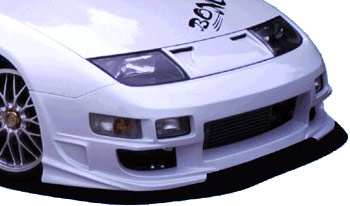
Here are pics of all the avalible bumpers for the Z32, feel free to add pics of any other bumpers, but please no chit chat. Lets just keep this factual.


89-98 OE Non Turbo

DSC_1092.JPG

89-98 OE Twin Turbo

300zx%20054.jpg

Wings West

300zx-1024.jpg

Stillen

300zx%20Feb06_16.JPG

  • Replies 34
  • Views 4.4k
  • Created
  • Last Reply

Top Posters In This Topic

Posted Images

Featured Replies

Is there a similar type thread for rear bumpers & spoilers???


Sorry to fill thread :rolleyes:

Dam'd


CompleteKit01.jpg


Varis


CompleteKit01-1.jpg


Kaze Aerocraft (the original that was around before the "Blade" or "Demon" copies)


CompleteKit01-2.jpg


Abflug 300ZG


Frontbumper01.jpg


Abflug Aero Tuning


Completekit01-3.jpg


Evolution Type II


ExplosionTypeIICompleteKit01.jpg


Evolution Signature


SignatureCompleteKit01-1.jpg


Kaminari Bumper Lip


Frontbumperlip01.jpg


Do-Luck T1


CompleteT1Kit01-1.jpg


Do Luck T33


t33.jpg


I have many, many others in the Bodykit database that I've amassed over the years. Some are rarities, or limited editions, others are one off custom jobs but as I'm about to nip out for a drink I don't have time to sort through them and post up the ones you can buy "off the shelf". I'll stick up a few more when I get chance. I also have each kits corresponding sideskirts, rear bumpers and rear bumper skirts where applicable.

  • 2 months later...
  • 2 weeks later...

Join the conversation

You can post now and register later. If you have an account, sign in now to post with your account.

Guest
Unfortunately, your content contains terms that we do not allow. Please edit your content to remove the highlighted words below.
Reply to this topic...

Recently Browsing 0

  • No registered users viewing this page.

Important Information

Terms of Use

Configure browser push notifications

Chrome (Android)
  1. Tap the lock icon next to the address bar.
  2. Tap Permissions → Notifications.
  3. Adjust your preference.
Chrome (Desktop)
  1. Click the padlock icon in the address bar.
  2. Select Site settings.
  3. Find Notifications and adjust your preference.