


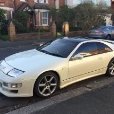
Get my 1st Zed in a few hours
- Replies 30
- Views 1.2k
- Created
- Last Reply



Popular Days
Featured Replies
Account
Navigation
Search
Configure browser push notifications
Chrome (Android)
- Tap the lock icon next to the address bar.
- Tap Permissions → Notifications.
- Adjust your preference.
Chrome (Desktop)
- Click the padlock icon in the address bar.
- Select Site settings.
- Find Notifications and adjust your preference.
Safari (iOS 16.4+)
- Ensure the site is installed via Add to Home Screen.
- Open Settings App → Notifications.
- Find your app name and adjust your preference.
Safari (macOS)
- Go to Safari → Preferences.
- Click the Websites tab.
- Select Notifications in the sidebar.
- Find this website and adjust your preference.
Edge (Android)
- Tap the lock icon next to the address bar.
- Tap Permissions.
- Find Notifications and adjust your preference.
Edge (Desktop)
- Click the padlock icon in the address bar.
- Click Permissions for this site.
- Find Notifications and adjust your preference.
Firefox (Android)
- Go to Settings → Site permissions.
- Tap Notifications.
- Find this site in the list and adjust your preference.
Firefox (Desktop)
- Open Firefox Settings.
- Search for Notifications.
- Find this site in the list and adjust your preference.
After loads of test drives, discussions on which one i should have and hours of deep thought i am now pleased to say at 6pm tommorow i'll get that proper first grin of driving my own zed.
I would like to thank all of the people who sent me advice and replied to my threads.
Many thanks to Matty for the pointers on keith's car.
Anyway i'll stop the oscar speech and look forward to getting the car soon.:dance: :dance:
Rich