Jump to content
View in the app

A better way to browse. Learn more.

300ZX Owners Club

A full-screen app on your home screen with push notifications, badges and more.

To install this app on iOS and iPadOS
  1. Tap the Share icon in Safari
  2. Scroll the menu and tap Add to Home Screen.
  3. Tap Add in the top-right corner.
To install this app on Android
  1. Tap the 3-dot menu (⋮) in the top-right corner of the browser.
  2. Tap Add to Home screen or Install app.
  3. Confirm by tapping Install.

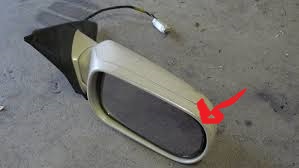
looking for a driver side mirror surround red arrow pointing to the part if anyone has one that would be great

images.jpg

  • Replies 36
  • Views 401
  • Created
  • Last Reply

Top Posters In This Topic

Posted Images

Featured Replies

There's a wing mirror one on eBay for£20?


yes but i only need the little bit on the front. if i cant find one will have to buy the whole thing lets see what si or mondo come up with

yes am watching that one mate

bump still looking for this part

I've found a pair of wing mirrors in the back of my shed. You're welcome to have the part you need off them Dan.

super tom thats great :clap:

I'll be in all day Saturday working on the house if you wana pop round & take the part off. I'll need to double check it's not broke so will get them out the shed tomorrow. I'm sure they're ok though

thats fine tom just text us to let me know there ok and will call up sat do you still have my number

will do

Join the conversation

You can post now and register later. If you have an account, sign in now to post with your account.

Guest
Unfortunately, your content contains terms that we do not allow. Please edit your content to remove the highlighted words below.
Reply to this topic...

Recently Browsing 0

  • No registered users viewing this page.

Important Information

Terms of Use

Configure browser push notifications

Chrome (Android)
  1. Tap the lock icon next to the address bar.
  2. Tap Permissions → Notifications.
  3. Adjust your preference.
Chrome (Desktop)
  1. Click the padlock icon in the address bar.
  2. Select Site settings.
  3. Find Notifications and adjust your preference.