


Who can make this?
- Replies 86
- Views 5.1k
- Created
- Last Reply
Top Posters In This Topic
-
Dave Brock 23 posts
-
oobumblebeeoo 16 posts
-
znut 6 posts
-
tomomontana 5 posts


Posted Images

.jpg.bf37787b72460fb3f4b07e7c2b90b805.jpg)
Featured Replies
Account
Navigation
Search
Configure browser push notifications
Chrome (Android)
- Tap the lock icon next to the address bar.
- Tap Permissions → Notifications.
- Adjust your preference.
Chrome (Desktop)
- Click the padlock icon in the address bar.
- Select Site settings.
- Find Notifications and adjust your preference.
Safari (iOS 16.4+)
- Ensure the site is installed via Add to Home Screen.
- Open Settings App → Notifications.
- Find your app name and adjust your preference.
Safari (macOS)
- Go to Safari → Preferences.
- Click the Websites tab.
- Select Notifications in the sidebar.
- Find this website and adjust your preference.
Edge (Android)
- Tap the lock icon next to the address bar.
- Tap Permissions.
- Find Notifications and adjust your preference.
Edge (Desktop)
- Click the padlock icon in the address bar.
- Click Permissions for this site.
- Find Notifications and adjust your preference.
Firefox (Android)
- Go to Settings → Site permissions.
- Tap Notifications.
- Find this site in the list and adjust your preference.
Firefox (Desktop)
- Open Firefox Settings.
- Search for Notifications.
- Find this site in the list and adjust your preference.
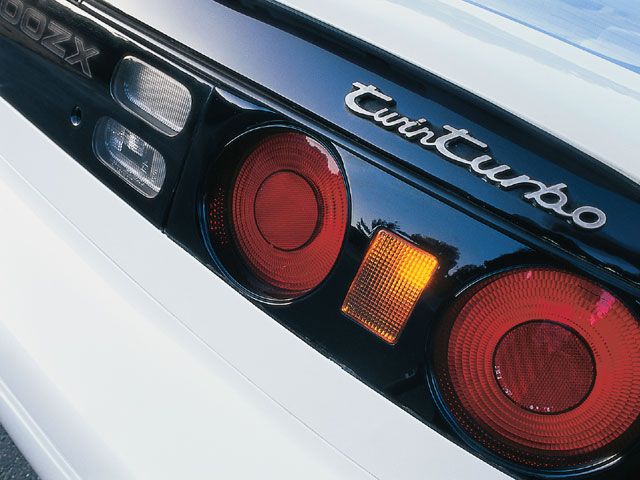
A friend sent me this picture today. Clearly it's photoshopped but I personally think it looks quite good (certainly different). So which one of you out there would know how to go about making a light panel like this one?