


I'm back with a new Zed!
- Replies 37
- Views 1.8k
- Created
- Last Reply
Top Posters In This Topic
-
insanezed 9 posts
-
Buckaroo Banzai 4 posts
-
stellaZ 3 posts
-
wow300 1 post


Featured Replies
Account
Navigation
Search
Configure browser push notifications
Chrome (Android)
- Tap the lock icon next to the address bar.
- Tap Permissions → Notifications.
- Adjust your preference.
Chrome (Desktop)
- Click the padlock icon in the address bar.
- Select Site settings.
- Find Notifications and adjust your preference.
Safari (iOS 16.4+)
- Ensure the site is installed via Add to Home Screen.
- Open Settings App → Notifications.
- Find your app name and adjust your preference.
Safari (macOS)
- Go to Safari → Preferences.
- Click the Websites tab.
- Select Notifications in the sidebar.
- Find this website and adjust your preference.
Edge (Android)
- Tap the lock icon next to the address bar.
- Tap Permissions.
- Find Notifications and adjust your preference.
Edge (Desktop)
- Click the padlock icon in the address bar.
- Click Permissions for this site.
- Find Notifications and adjust your preference.
Firefox (Android)
- Go to Settings → Site permissions.
- Tap Notifications.
- Find this site in the list and adjust your preference.
Firefox (Desktop)
- Open Firefox Settings.
- Search for Notifications.
- Find this site in the list and adjust your preference.
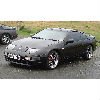
Hi all, been a while but I'm back with a new Zed.
Just bought this last weekend from croeso, some of you will probably know it....
...but those who dont I'm sure you'll see it at future meets and events.
These are some of croeso's pics as I've not took any myself yet.
It's really good to be back behind the wheel of the Z32, especially this one.
Must say I prefer this to the 350Z I had previously which was something of a let down after owning a 300ZX TT before that.
What do you all think?
Did I do good?
Edited by Daves_Zed
Sorted links for you