Jump to content
View in the app

A better way to browse. Learn more.

300ZX Owners Club

A full-screen app on your home screen with push notifications, badges and more.

To install this app on iOS and iPadOS
  1. Tap the Share icon in Safari
  2. Scroll the menu and tap Add to Home Screen.
  3. Tap Add in the top-right corner.
To install this app on Android
  1. Tap the 3-dot menu (⋮) in the top-right corner of the browser.
  2. Tap Add to Home screen or Install app.
  3. Confirm by tapping Install.

jedijamiel

Dormant Member
  • Joined

  • Last visited

  • Country

    United Kingdom
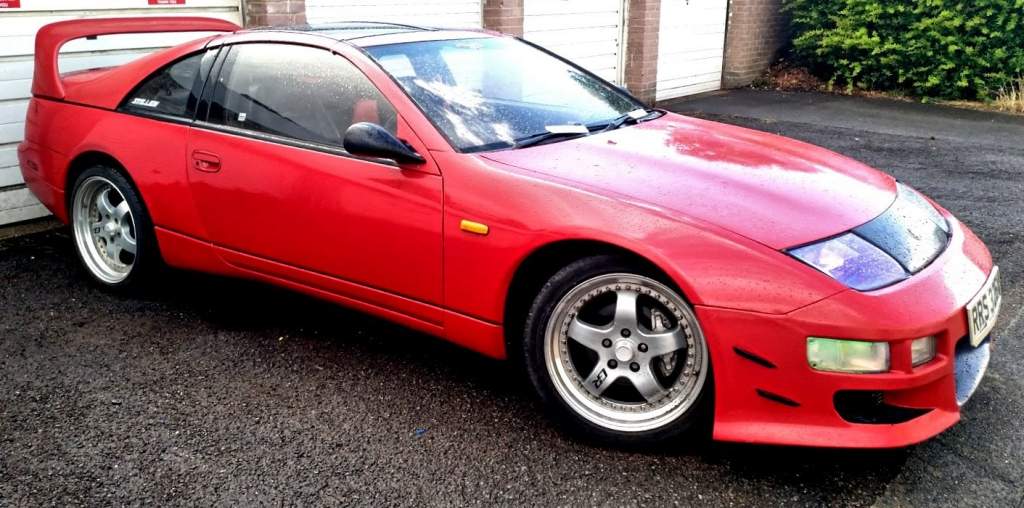
  1. Hi all, Thanks for accepting my request to join the group. My name is Jamie, I live in Essex and I have just purchased my first 300ZX. My aim is to bring it back to its former glory. Although it has MOT and able to drive it, I am putting it into my garage as a project for the next year. Needs some paint TLC, electrics, wheel refurbishment and some general love including a crazy mad speedometer. I'm hoping your experience can help me going forward. So a little bit about the car: 1989 Nissan 300zx NA, 70k miles and imported from Japan (my first imported car) hoping as non turbo is may be less likely to break weekly lol
Important Information

Terms of Use

Configure browser push notifications

Chrome (Android)
  1. Tap the lock icon next to the address bar.
  2. Tap Permissions → Notifications.
  3. Adjust your preference.
Chrome (Desktop)
  1. Click the padlock icon in the address bar.
  2. Select Site settings.
  3. Find Notifications and adjust your preference.