


Everything posted by raz4442
-
Perfect bud from Glasgow area so will be down shortly should be there for 7:30 thanks for getting in touch
-
Guys is anyone going to the meet today ?
-
Hi Guys is this still on ? Who is all coming to the meet ? I would like to pop over and meet everyone as im pretty new the this Club ive mainly been around the Supra owners club meets so would be good to meet everyone
-
Hi Buddy Sooo looking forward to the Z when i get it running properly cant believe that i have not been in a running twinturbo i just got mine a couple of month back but not had the pleasure of driving it as it needs a attention to the engine are you going to the meet.
-
Hi Guys much appriciated on yous all getting in touch, my Z unfortunately is in the process of getting repaired as it is down a cylinder and not running propely anyways i may pop down to see yous all at 7:30 any info or help i can get from yous would be great also gives me a chance to say hi
-
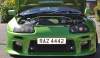
Hi guys, just want to introduce myself, Im Raz from Glasgow, Scotland area, have we got some Scottish owners here as for the past 7 years ive owned a Toyota Supra and now moved on to one of my favourite cars the ZX Z32 TT, give me a shout i would love to attend any Scottish meets. Thanks RAZ
