-
will be great to be there, but i will be away from NI this day ://
-
tomyl620 i'm not sure about the BC in this month.. last year was once per mont, but in this year i hear they organise drifr and drag racing just 3 or 4 times :/ RichardSmitch good to know about the OEM sender, £90 is not to expensive, so i will be fix this :)
-
thank You all for warm welcom me & my zed :)
-
Adam D Yes, i beat the mazda :) but after few racing i don't know why my oil presure start be very low :/ TwinTurboRich i can see thats Brian is very perv ;) RichardSmitch haha i know the exhaust don't look good ;) i will be change them soon ;) tomyl620 yes, that was on BC, last November :)
-
don't worry znut thats good forum :) avatar is just a avatar :P ;)
-
This event is on April or May? The Mondello sounds nice, i can come like a spectator, my FairLady will be not ready yet
-
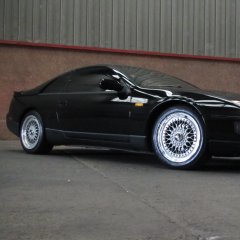
Hello Everyone! My name is Anna :angel: I'm from Poland but I live in Belfast 2,5years. I have the Nissan Twin Turbo 300zx FairLady Z and i LOVE this car :) My adventure with Nissan began last year. I take the time now to small modifications and engine repair. I'm happy that i register here and hope so when i will sorted evertythink we will be meet together on the events and on the track :) few pics:

View in the app
A better way to browse. Learn more.