


-
Thank you. Weather this weekend was designed for this.
-
Thanks Jeff, you are the man!
-
If not, I will take some on weekend on my crappy phone camera
-
Jeff has taken some pics of it in his workshop, he said he will email them to me and I will post them up asap.
-
Took the car to Zedworld today. Best service I have received from any company, ever. Jeff and his Mrs are top people. Car was in quite good nick, one or two advisories to get done in a couple of weeks time and I'm sorted.
-
Yes I will subscribe this week once I sort out my Paypal
-
I have heard many good things about Zedworld, and you guys have made me even more reassured. Can't wait to drive it back from there tomorrow and just enjoy it! And yes, I treat my wife very well indeed!
-
Thanks for the warm welcome guys
-
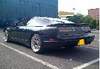
I am a new Zed owner. I have recently been given a 300ZX as a birthday gift by my very kind wife. Taking it tomorrow to Zedworld in Tamworth for a full service and to look over it thoroughly. Complete newbie, no previous car history (I drive a diesel Skoda normally) so I look forward to being guided and advised by the good members of this forum. Car seems pretty standard unmodified import, although I know nothing about engines etc beyond topping up oil and water... Will update with some pics later this week after the service and once I have given it a wash. Wish me luck. I intend to keep this car forever, it is a true dream of mine to own it.

View in the app
A better way to browse. Learn more.
