Jump to content
View in the app

A better way to browse. Learn more.

300ZX Owners Club

A full-screen app on your home screen with push notifications, badges and more.

To install this app on iOS and iPadOS
  1. Tap the Share icon in Safari
  2. Scroll the menu and tap Add to Home Screen.
  3. Tap Add in the top-right corner.
To install this app on Android
  1. Tap the 3-dot menu (⋮) in the top-right corner of the browser.
  2. Tap Add to Home screen or Install app.
  3. Confirm by tapping Install.
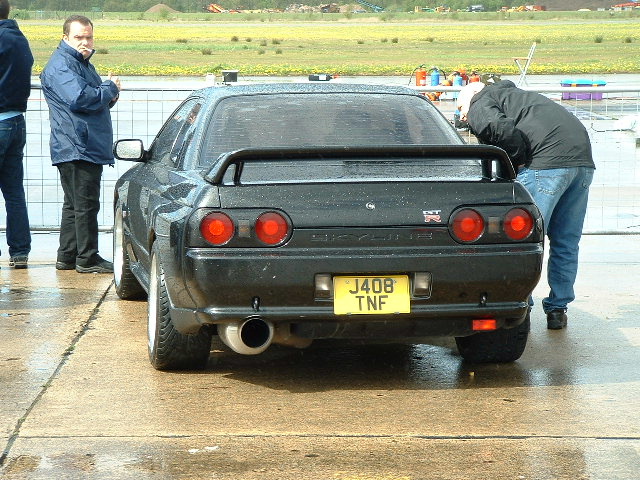
soboring.JPG

Featured Replies

Nope, but they will be running low tens at Elvington, oh yes.

More to the point is that Mini Me on the right ??? :rolleyes:

Originally posted by senna

Nope, but they will be running low tens at Elvington, oh yes.

??? and your point? lol Zeds are running low 7s at mexico city this week oh yes lol.

I haven't got a perishing clue !


I have studied this thread in minute detail and I cannot for the life of me fathom out what it is meant to signify ;)


Do Mondeos make you bald?

Do Mondeos make you have short hair/and/or long hair or strange hair?

Is the bloke on the right a rent-person?

What the f*** is that stupid high chair doing next to all those gas cannisters?

What is the point, if indeed there was one?


Ngikufisela inhlanhla

Do Mondeos make you bald? - only if you are very tall & have sandpaper for headlining


Do Mondeos make you have short hair/and/or long hair or strange hair? - only as an optional extra at time of order


Is the bloke on the right a rent-person? - no, he has a mortgage


What the f*** is that stupid high chair doing next to all those gas cannisters? - it is an umpires chair & the cannisters are a makeshift "net" for tennis, exclusivly there for Skyline owners


What is the point, if indeed there was one? - Ngikufisela inhlanhla


HTH :)

Well done Paul, you win the Fondue Set and matching Mini Metro.


I feel a Roger Irrelevant thread brewing.


Kipper.


I say we take off and nuke the site from orbit. Its the only way to be sure.

Join the conversation

You can post now and register later. If you have an account, sign in now to post with your account.

Guest
Unfortunately, your content contains terms that we do not allow. Please edit your content to remove the highlighted words below.
Reply to this topic...

Recently Browsing 0

  • No registered users viewing this page.

Important Information

Terms of Use

Configure browser push notifications

Chrome (Android)
  1. Tap the lock icon next to the address bar.
  2. Tap Permissions → Notifications.
  3. Adjust your preference.
Chrome (Desktop)
  1. Click the padlock icon in the address bar.
  2. Select Site settings.
  3. Find Notifications and adjust your preference.