


Nissan 300ZX TT 1991 Red (FRV) - Sold
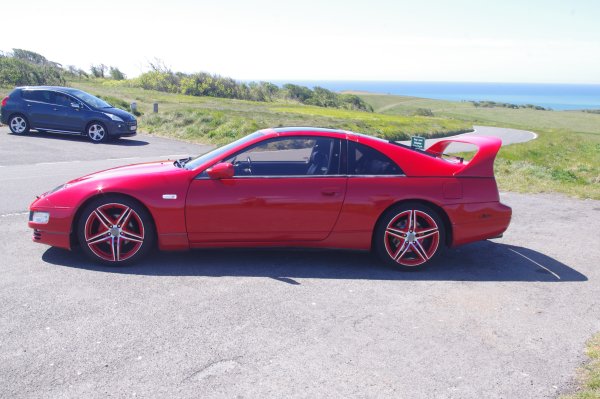
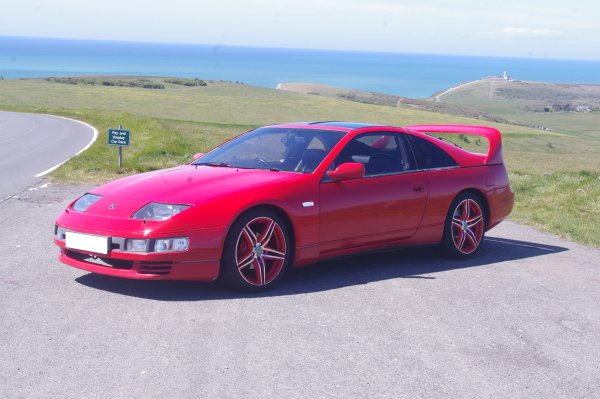
Pictures of my red Zed. This is my "show" car, the one I take to shows and enjoy day outs in. I hope one day to get it to an excellent standard.
It was bought August 2017 with blown turbos. They were swapped out with 2nd hand ones from a forum member just to get it back on the road as a temporary measure, However its still going!
In its life it had a completely red interior (back to stock now), its been chipped and tuned and boosts at over 20psi. I have sinced reduced the boost to keep it alive! I have slowly turned it back into a stock car with a stock front bumper, lights, etc. The wheels will be changed eventually as well because although they have grown on me and do suit the brashness of the car, they are 255 and the car needs something wider really because it will spin up in every gear!
The future will sport an engine rebuild, new turbos, upgraded fuel pump and some new injectors, then be tuned professionally too future proof it for the coming years.
As much as I loved FRV, it had to be sold in May 2021. It got exported to Ireland to keep another zed owner happy!
16 images
-
By TheRealNips
-
By TheRealNips
-
By TheRealNips
-
By TheRealNips
-
By TheRealNips
-
By TheRealNips
-
By TheRealNips
-
By TheRealNips
-
By TheRealNips
-
By TheRealNips
-
By TheRealNips
-
By TheRealNips
-
By TheRealNips
-
By TheRealNips
-
By TheRealNips
-
By TheRealNips



.jpg.a216a0eb8f436131bf6410edf5a4ffc9.jpg)
.jpg.8ade86115457a9e6d0d73546d5531e5c.jpg)
.jpg.f2a185b2d384eff76c8e981ae8d1feb9.jpg)
.jpg.699eb80accdfea55dd06cfd9c0a39bf9.jpg)
.jpg.db9f4d2f14f3ea3975bec9388f011e01.jpg)
.jpg.e704d1348a0165f3ed443cd6222aba69.jpg)
.jpg.1b50121bec59351498f8365cc34ce4e5.jpg)
.jpg.2f0401358be11b24b35406b2342e1e75.jpg)
.jpg.eaf8c25dcc25b82f8e541383a789fd70.jpg)
.jpg.2e30140818d521764f9d132ecc4bd073.jpg)
